


Question

Attribute Name User Parameter

  • February 28, 2019
  • 4 replies
  • 51 views

pflegpet
Contributor
Forum|alt.badge.img+8

Hi,

is there a way to restrict the "attribute name" parameter to specific attribute names. I use it for chosing the attributes of an Excel file that has lots of attributes so the drop down list gets very busy. I tried to use the choice parameter as an alternative but it seems you can only use it for attribute values not names. Thank you for your help.


 

This post is closed to further activity.
It may be an old question, an answered question, an implemented idea, or a notification-only post.
Please check post dates before relying on any information in a question or answer.
For follow-up or related questions, please post a new question or idea.
If there is a genuine update to be made, please contact us and request that the post is reopened.

4 replies

takashi
Celebrity
  • February 28, 2019

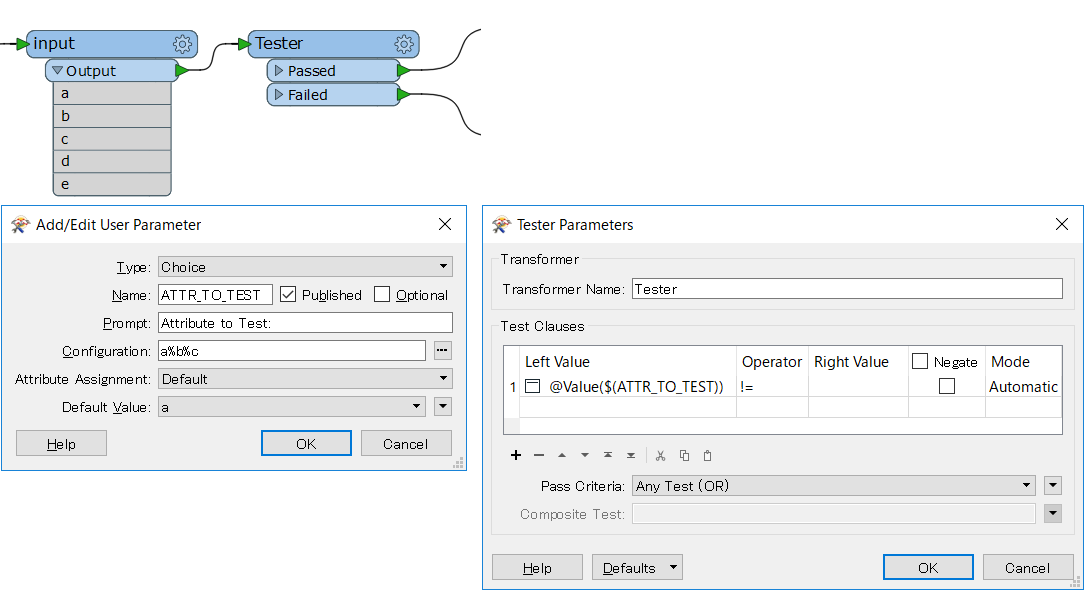
Hi @kasparlov, I think the Choice parameter could also be used to specify an attribute name, depending on where the parameter is referenced.

Where/How the parameter is referenced in the workspace?


arnovananrooij
Contributor
Forum|alt.badge.img+5

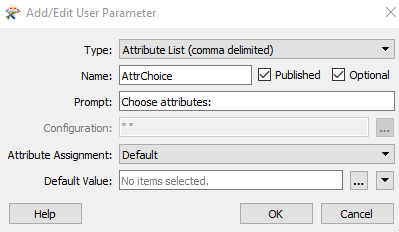
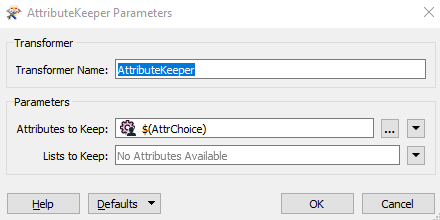
Hi @kasparlov, you could add a published parameter of type attribute list (comma delimited) and use this parameter in an AttributeKeeper


pflegpet
Contributor
Forum|alt.badge.img+8
  • Author
  • Contributor
  • March 1, 2019

Hi @kasparlov, I think the Choice parameter could also be used to specify an attribute name, depending on where the parameter is referenced.

Where/How the parameter is referenced in the workspace?

Hi @takashi, I would use the parameter in a Tester: Parameter: Attribute has a value.


takashi
Celebrity
  • March 1, 2019

Hi @kasparlov, I think the Choice parameter could also be used to specify an attribute name, depending on where the parameter is referenced.

Where/How the parameter is referenced in the workspace?

I think a Choice type parameter and the != operator could work as your expected.