I am new to FME Desktop and I would like to get help in order to extract all the street side segments which are located within 5 meters from the standpipes. The resulting segments must also contain the attributes of the standpipes that meet the selection criteria and produce an Excel report of all the selected segments.
How can I achieve this task using FME?
PS. I'm using FME Desktop 2020
Thank you!
Best answer by jiro
Hello @deanhowell,
Thank you for your answer. I found your method straightfoward and in my case the two tables I'm using are stored in Oracle database and I guess I could achieve the process for extracting the information in a regular basis.
I'll give it a try your method and see if it's work in my case.
Here is a subset data I'm using from street sides road network and the standpipes location.
This post is closed to further activity.
It may be an old question, an answered question, an implemented idea, or a notification-only post.
Please check post dates before relying on any information in a question or answer.
For follow-up or related questions, please post a new question or idea.
If there is a genuine update to be made, please contact us and request that the post is reopened.
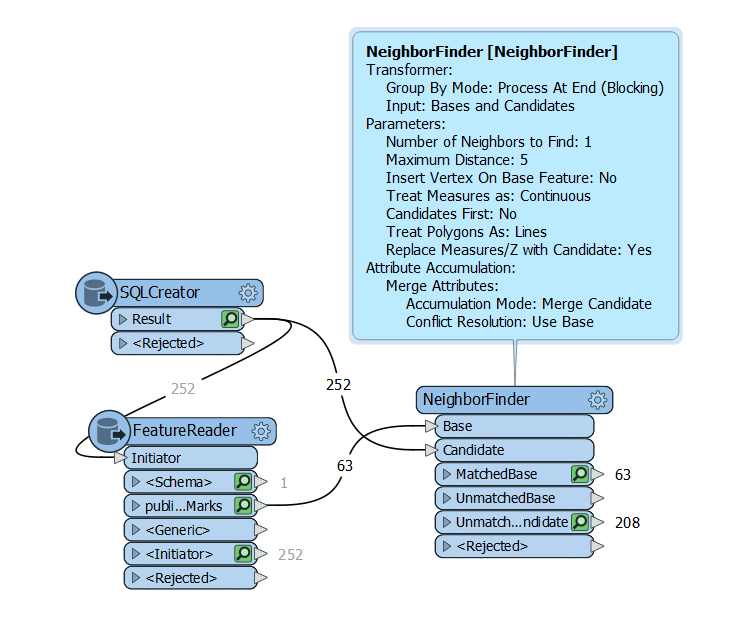
Hello @jiro, you could use the neighbour finder with a distance of 5. In my example below of I have read in some roads in a particular suburb and used that to read the point features that share the bounding box of the roads, then the neighbour finder. It needs a lot of refining but happy to help further if you can share some sample data.
Thank you for your answer. I found your method straightfoward and in my case the two tables I'm using are stored in Oracle database and I guess I could achieve the process for extracting the information in a regular basis.
I'll give it a try your method and see if it's work in my case.
Here is a subset data I'm using from street sides road network and the standpipes location.
Thank you for your answer. I found your method straightfoward and in my case the two tables I'm using are stored in Oracle database and I guess I could achieve the process for extracting the information in a regular basis.
I'll give it a try your method and see if it's work in my case.
Here is a subset data I'm using from street sides road network and the standpipes location.
Here is an option using your data and sending the results to the spreadsheet. It just finds the single closest street side to the standpipe within 5 meters, so you might still need to play to tune it for situations where it is closest to an adjacent street.
We got a blackout yesterday because of strong winds...
Thank you again Dean for your help it's very appreciated! Your approch meets my need. However, as I mentioned, I prefer a direct connection to the data source with a SQL Creator in order to run the workspace regularly.
I tried to use SQLCreator transformer to connect to my Oracle Spatial schema to read side roads network table and the FeatureReader to read the standpipes table unfortunately I get unexpected reults. Fortumately, using shapefiles tables work fine.
I'm trying to find out a solution by myself nut if I don't succeed I will get back to you.