


Question

Texture for building -Citygml

  • January 30, 2019
  • 1 reply
  • 21 views

kumarkannan1980
Participant
Forum|alt.badge.img+6

Hi,

I have 10 building and 10 JPEG files, each JPEG is specific to the buildings .Physical path of the JPEG is configured in the attribute called "path". I need to apply textures based on the attribute "path" .


How can I achieve this?


Regards,

K.Jayakumar

This post is closed to further activity.
It may be an old question, an answered question, an implemented idea, or a notification-only post.
Please check post dates before relying on any information in a question or answer.
For follow-up or related questions, please post a new question or idea.
If there is a genuine update to be made, please contact us and request that the post is reopened.

1 reply

daveatsafe
Safer
Forum|alt.badge.img+20
  • Safer
  • January 30, 2019

Hi @kumarkannan1980,

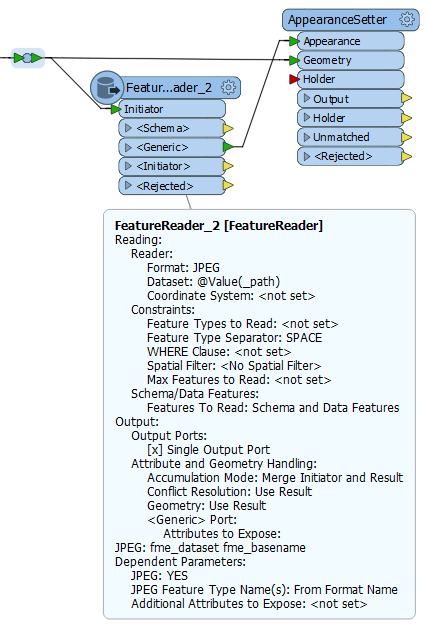
Please add a FeatureReader to your workspace, and route a copy of the building to the Initiator port. Open the FeatureReader properties and:

  • Set the Reader -> Format to JPEG.
  • Click on the down arrow icon beside Dataset and choose Attribute -> path.
  • Set Output Ports to Single Output Port.
  • Expand Attribute and Geometry Handling. Set Accumulation Mode to Merge Initiator and Result.

Connect the <Generic> output of the FeatureReader to the Appearance port of an AppearanceSetter. Connect the CItyGML Buildings to the Geometry port of the same transformer. Open the Properties and set Group By to data.

This will apply the appropriate JPEG as a texture on each building.