


Question

"Shadown" in final Mosaic

  • October 24, 2024
  • 4 replies
  • 49 views

mr_fme
Enthusiast
Forum|alt.badge.img+9

Hi,

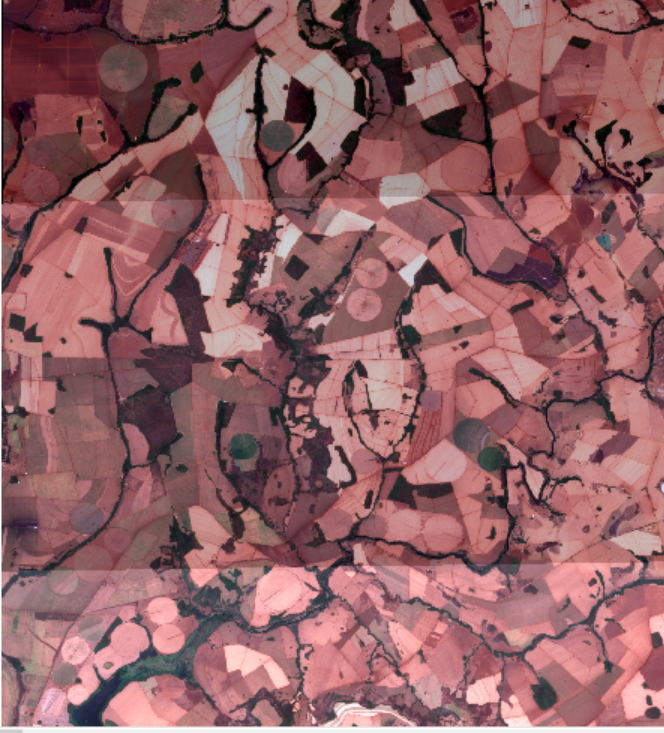
I'm using the Raster Mosaicker to create a mosaic with overlapping images. However, the final result generates 'shadows' as shown in the image below. What is the best configuration or additional transformer I can use to solve this problem?

Thank you
 

4 replies

jobvdnoort
Supporter
Forum|alt.badge.img+13
  • Supporter
  • October 25, 2024

Hi mr_fme,


I’m having a bit of trouble understanding the exact problem you’re encountering. Could you please provide a bit more detail or clarify certain aspects? For example, it would be helpful to know:

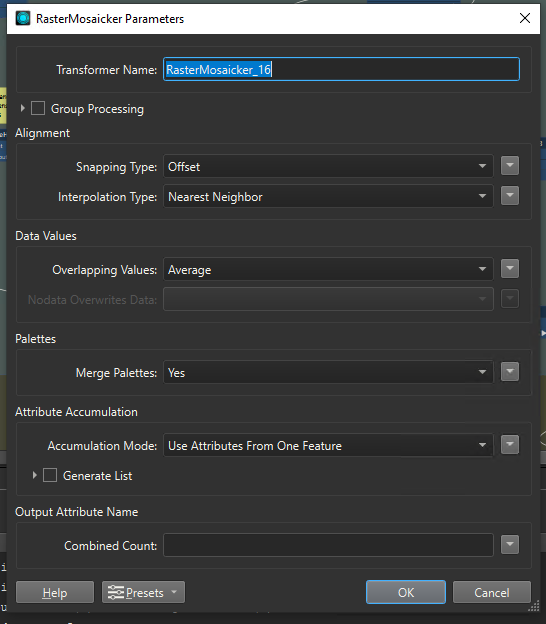
  1. The specific configuration settings you are currently using.
  2. The type of images you are working with.
  3. Any specific steps you have already taken to try and resolve the issue.

Kind regards,

Job


mr_fme
Enthusiast
Forum|alt.badge.img+9
  • Author
  • Enthusiast
  • October 25, 2024

Hi, @jobvdnoort

  1. The specific configuration settings you are currently using.


  1. The type of images you are working with.

Sentinel 2, RGB band.

  1. Any specific steps you have already taken to try and resolve the issue.

I tried change the RasterMosaicker configurantions only.


Thank´s


jobvdnoort
Supporter
Forum|alt.badge.img+13
  • Supporter
  • October 25, 2024

Hi I assume you want to smooth the data which overlaps, thats why you use average?

  1. Averaging:

    • This method calculates the average value of the overlapping pixels. It can be useful when you want to smooth out the data and reduce noise. However, it might not be ideal if the overlapping areas have significant differences and you want to preserve the integrity of one of the rasters.
  2. Last Method:

    • The "Last" method takes the value from the last raster in the stack for the overlapping areas. This can be useful if you want to prioritize the data from one raster over another and avoid averaging. It effectively cuts one of the rasters and only uses the values from the last raster in the overlapping areas.

Based on the photo you mentioned, it seems like using the "Last" method might be a good option for your specific case, as it can help you preserve the integrity of one raster in the overlapping areas.

Kr,

Job


mr_fme
Enthusiast
Forum|alt.badge.img+9
  • Author
  • Enthusiast
  • October 25, 2024

Hi,

I don´t believe in problems with Overlaps mode.


I was tried anothers configurations. My problem is brightness between images.