


Question

Merge attributes from overlaying features - Best practice

  • January 28, 2020
  • 9 replies
  • 40 views

aron
Enthusiast
Forum|alt.badge.img+16

I have asked similar questions before and tried loads of different solutions. It seems like such a simple thing, but so far I have not been able to get the result I want. I thought I would try and start clean, maybe this can help me make sense of this.

Imagine a dataset where some of the features are overlaying. (There are more attributes than those described, varius sources and not all features are overlaying.)

In this dataset I want to identify polylines that are overlying and merge certain attributes from them.


Feature


Attribute A


Attribute B


Attribute C


Attribute D1


A


2


B


3


C


4


D


The desired outcome of the four overlaying features above would be a new feature with the following attributes:

newFeature


A


B


C


D


Empty cells should always be filled if possible. A kind of dissolver of attributes.

How would you experts go about achieving this?

This post is closed to further activity.
It may be an old question, an answered question, an implemented idea, or a notification-only post.
Please check post dates before relying on any information in a question or answer.
For follow-up or related questions, please post a new question or idea.
If there is a genuine update to be made, please contact us and request that the post is reopened.

9 replies

redgeographics
Celebrity
Forum|alt.badge.img+62

The LineOnLineOverlayer has the standard Attribute Accumulation settings, one of them being "Merge Attributes". If you are certain there's not going to be a conflict that is probably the easiest thing to do.

Other than that it offers the option to create a list, you could use that to deal with conflicts, but exactly how depends on what you want to do with those conflicts.


erik_jan
Contributor
Forum|alt.badge.img+26
  • Contributor
  • January 28, 2020

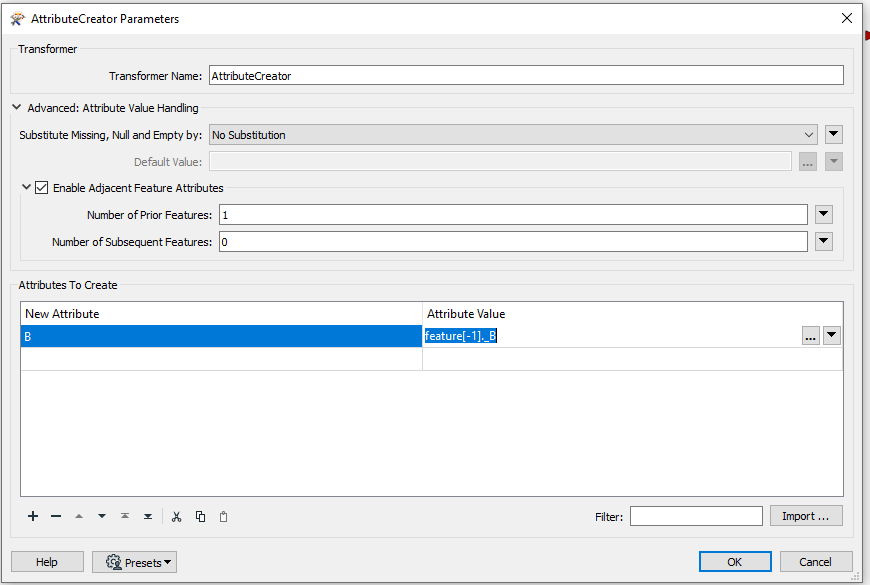
You can do this using the advanced settings in the AttributeCreator as shown below:

Hope this helps


aron
Enthusiast
Forum|alt.badge.img+16
  • Author
  • Enthusiast
  • January 29, 2020

The LineOnLineOverlayer has the standard Attribute Accumulation settings, one of them being "Merge Attributes". If you are certain there's not going to be a conflict that is probably the easiest thing to do.

Other than that it offers the option to create a list, you could use that to deal with conflicts, but exactly how depends on what you want to do with those conflicts.

@redgeographics, I have been trying various spatial transformers in combination with list. But so far I have not been able to achieve consistent results. I end up with far to many "what's and if's" that need to be compensated for.


aron
Enthusiast
Forum|alt.badge.img+16
  • Author
  • Enthusiast
  • January 29, 2020

You can do this using the advanced settings in the AttributeCreator as shown below:

Hope this helps

@erik_jan Interesting!

This is a new method that I have not explored before. I will definitely try this!

A follow up question: From the documentation I get the impression that one needs to set a number for the features that are to be taken into account?. Is there a way to set this to 'all', for those instaces where the number is unknown? Or can one use _countedoverlays to achieve this?


redgeographics
Celebrity
Forum|alt.badge.img+62

@redgeographics, I have been trying various spatial transformers in combination with list. But so far I have not been able to achieve consistent results. I end up with far to many "what's and if's" that need to be compensated for.

Can you share a specific example (data + your workspace)?


bwn
Evangelist
Forum|alt.badge.img+26
  • Evangelist
  • January 29, 2020

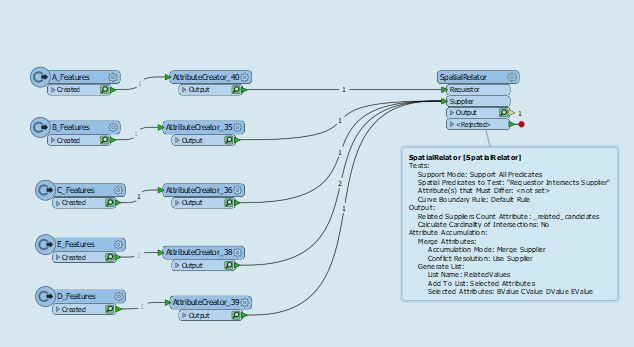
@aron . Perhaps overthinking this. Below works for me.

So long as the Value Attributes for B, C, D and E are all named differently from each other, then there is no Attribute Name conflicts when SpatialRelator merges first A, then B, then C, then D, then E. If there are no features that overlay from B, C, D or E, then that will show as "Missing" in the output of for any of A's Features exiting the Transformer.


aron
Enthusiast
Forum|alt.badge.img+16
  • Author
  • Enthusiast
  • January 30, 2020

@aron . Perhaps overthinking this. Below works for me.

So long as the Value Attributes for B, C, D and E are all named differently from each other, then there is no Attribute Name conflicts when SpatialRelator merges first A, then B, then C, then D, then E. If there are no features that overlay from B, C, D or E, then that will show as "Missing" in the output of for any of A's Features exiting the Transformer.

Thing is that they share the same names.

There could be 5 overlaping lines or none. Feature 1 could have attributes A and C and feature two could have B and D. Or feature 1 could have A, B and C - and feature 2 and 3 could have none of theese attributes. I need to build a workplace that can adapt to varying inputs


aron
Enthusiast
Forum|alt.badge.img+16
  • Author
  • Enthusiast
  • January 30, 2020

Can you share a specific example (data + your workspace)?

There is more info from earlier in my build process. https://knowledge.safe.com/questions/106417/merge-attributes-from-mulitple-features-onto-new-o.html?childToView=106439#answer-106439

Combine the work space I posted there and features with any combinations of X and Y in my table above. Hopefully that would give you a fairly good picture of what I am trying to achieve.

takashi
Celebrity
  • January 30, 2020

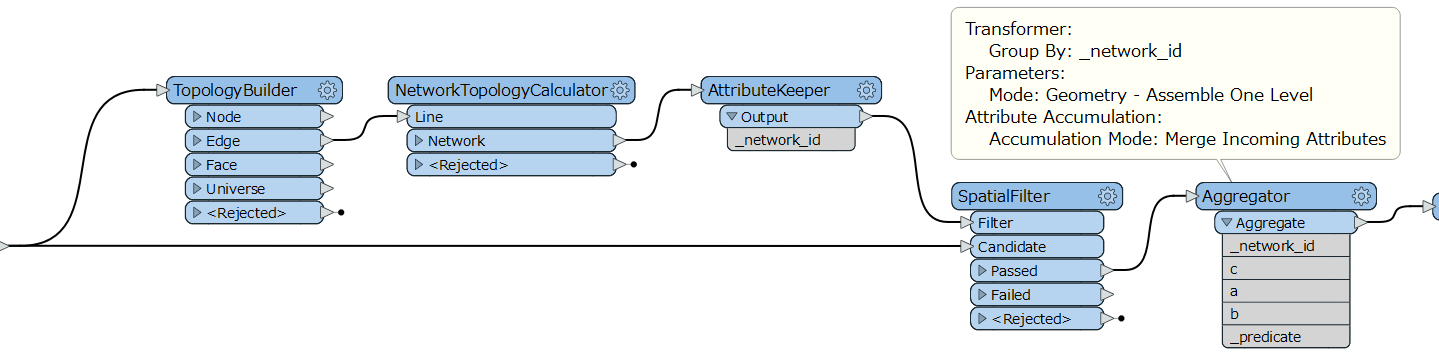
If I understood your requirement correctly, this workflow might help you.

  1. TopologyBuilder: Build networks from the original lines.
  2. NetworkTopologyCalculator: Add network ID which is unique for each connected network to the network edges.
  3. SpatialFilter: Merge the network ID to the original lines according to the spatial relationships.
  4. Aggregator (Group By: network ID, Accumulation Mode: Merge Incoming Attributes): Aggregate the lines grouping by the network ID and merge the their attributes.