
Question

Textured CityGML to 3DTiles(.b3dm) conversion problem

  • December 12, 2017
  • 4 replies
  • 91 views

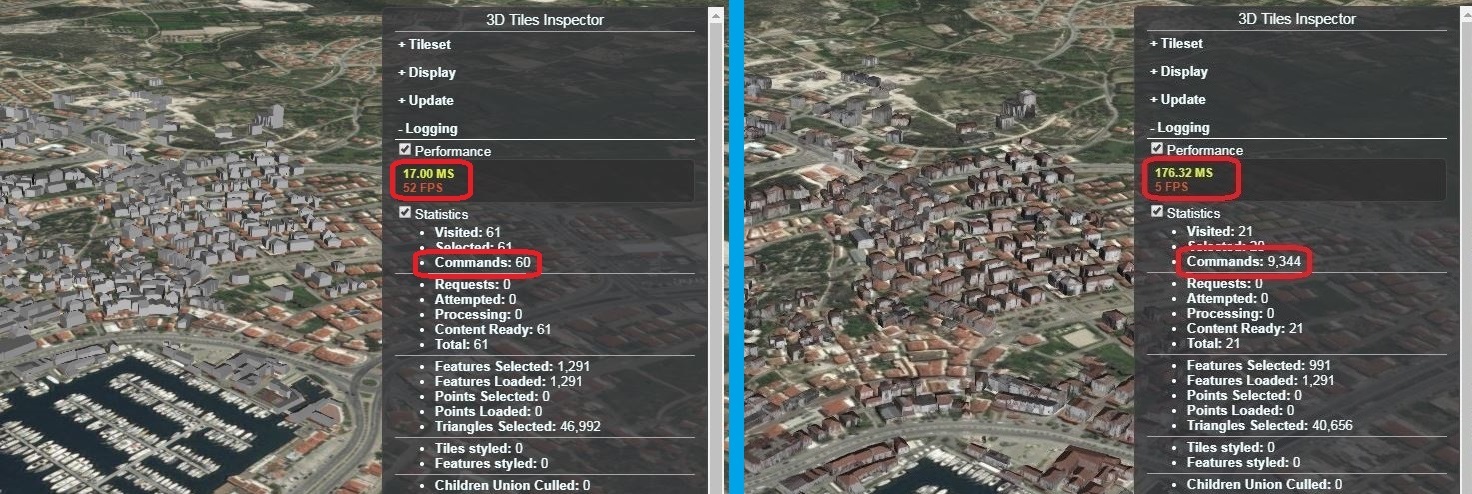
Hello , i got textured CityGML files and converted them to .b3dm format using FME.But when i visualize them on Cesium , its becoming amazingly slow.I dropped quality of textures and gzipped them but still same problem occuring.

Here is link for CityGML files:

https://www.dropbox.com/s/1dbf9gvmatbvem3/cesme_citygml.rar?dl=0

And for converted 3DTiles

https://www.dropbox.com/s/7lh01wo25dqzarf/cesme_3dtiles.rar?dl=0

I would be so appreciated if you can solve my problem.
This post is closed to further activity.
It may be an old question, an answered question, an implemented idea, or a notification-only post.
Please check post dates before relying on any information in a question or answer.
For follow-up or related questions, please post a new question or idea.
If there is a genuine update to be made, please contact us and request that the post is reopened.

4 replies

I think the problem might be about this.Theres no problem at output without textures , but when i do conversion with textures this happens.


daveatsafe
Safer
Forum|alt.badge.img+20
  • Safer
  • December 20, 2017

Hi @demircioglu2k,

The CityGML dataset included over 11000 texture images. It is likely the large number of images, rather than their size, that is causing the slowdown in the Cesium rendering.

You may be able to speed up the rendering by replacing the individual roof and wall textures with a couple of generic roof and wall textures. The buildings in this area seem to have quite similar appearances, so you wouldn't lose a lot of realism with the generic textures.


You can check this blog post about this problem

https://cesium.com/blog/2018/02/06/citygml-testbed-13/


daveatsafe
Safer
Forum|alt.badge.img+20
  • Safer
  • March 5, 2018

You can check this blog post about this problem

https://cesium.com/blog/2018/02/06/citygml-testbed-13/

Lots of good info in there. I think the texture atlassing would be the most helpful in your case.



