
Solved

Shapefile surfaces issue

  • March 13, 2020
  • 1 reply
  • 30 views

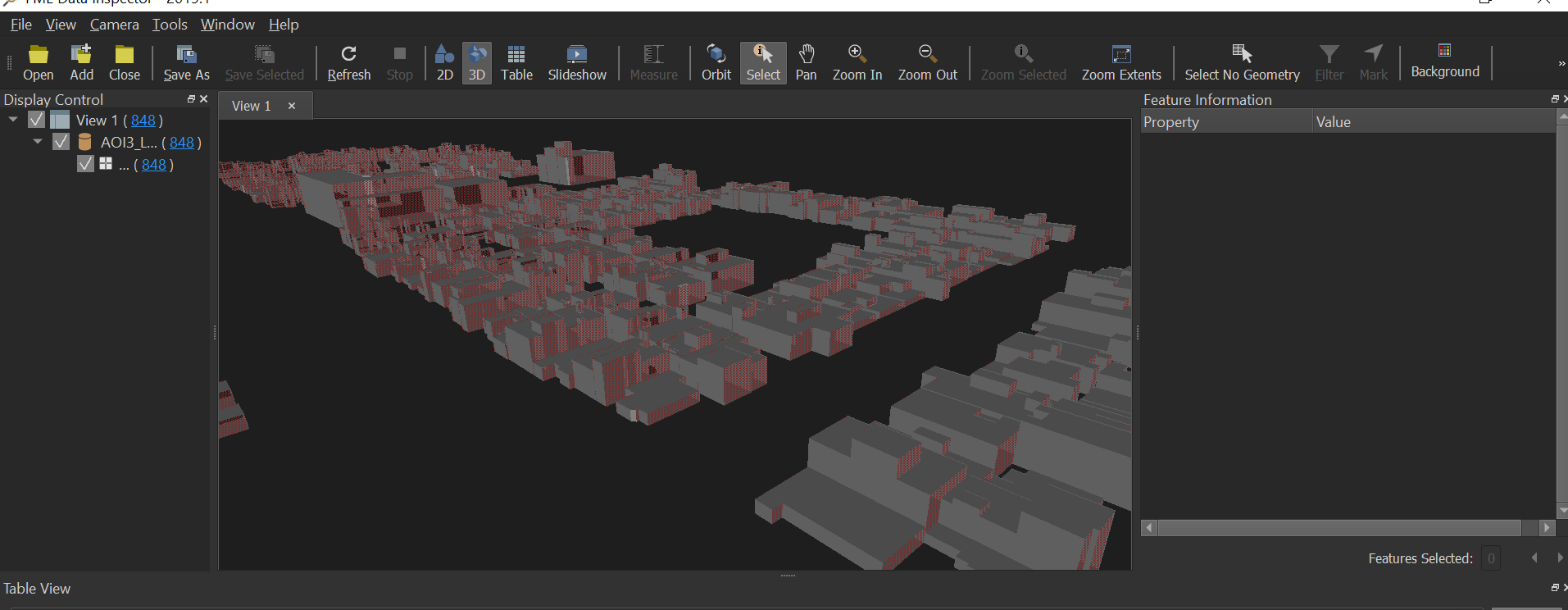
I tried converting a shapefile to cesium 3dtiles but after conversion some wall surfaces of the shapefile buildings are missing.When i inspected the data in fme data inspector the missing wall surfaces are transparent.Why some surfaces are transparent, I have attached the image of the shapefile viewed in inspector .How to bring all the wall surfaces in the output tileset without missing.


Best answer by daveatsafe

The surfaces appear to be single sided.

You can try forcing to double-sided using a GeometryColorSetter to add color to both the front and back side.

Alternatively, since your data seems to have all the sides of the building, you could try using the SolidBuilder, which will force the visible side to the outside of the models.

This post is closed to further activity.
It may be an old question, an answered question, an implemented idea, or a notification-only post.
Please check post dates before relying on any information in a question or answer.
For follow-up or related questions, please post a new question or idea.
If there is a genuine update to be made, please contact us and request that the post is reopened.

1 reply

daveatsafe
Safer
Forum|alt.badge.img+20
  • Safer
  • Best Answer
  • March 13, 2020

The surfaces appear to be single sided.

You can try forcing to double-sided using a GeometryColorSetter to add color to both the front and back side.

Alternatively, since your data seems to have all the sides of the building, you could try using the SolidBuilder, which will force the visible side to the outside of the models.

