


Question

Merge borering shape files with diferent names

  • March 12, 2019
  • 3 replies
  • 27 views

aron
Enthusiast
Forum|alt.badge.img+16

I have a dataset with a large number of areas (tiles) that border each other. Each area contains a large number of shape files. Each area folder holds the same types of data. All files have unique names.

They have the following syntax: area_datatype.shp.

I would like to merge all the files of a similar datatype into one. So instead of having X areas with Y shape files in each I would like to have Y shapefiles covering all areas X.

The standard procedure is to build a dynamic work space and use fme_feature_type for the output, but I can't get it working this time. My guess is that I somehow need to pull the name of the data table, if that is possible? Or is there some nifty setting that I might have missed?

Any advice on how I can get this to work?

This post is closed to further activity.
It may be an old question, an answered question, an implemented idea, or a notification-only post.
Please check post dates before relying on any information in a question or answer.
For follow-up or related questions, please post a new question or idea.
If there is a genuine update to be made, please contact us and request that the post is reopened.

3 replies

takashi
Celebrity
  • March 12, 2019

I think you could still use fme_feature_type as the schema definition name, if you defined the destination Shepefile name with other attribute e.g. "_filename".

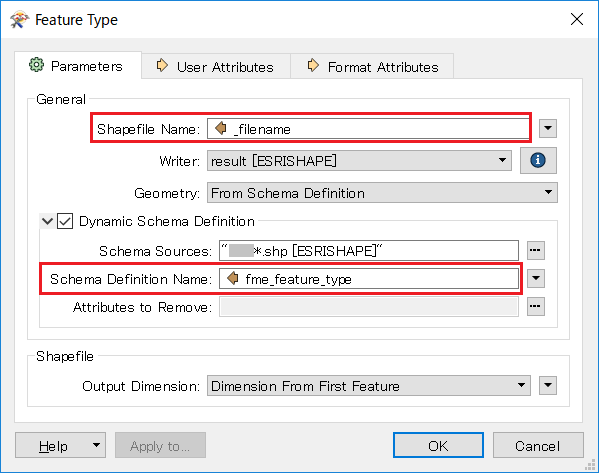
In the dynamic writer feature type, set fme_feature_type to Schema Definition Name explicitly and set the destination file name to Shapefile Name, as in:


aron
Enthusiast
Forum|alt.badge.img+16
  • Author
  • Enthusiast
  • March 13, 2019

I think you could still use fme_feature_type as the schema definition name, if you defined the destination Shepefile name with other attribute e.g. "_filename".

In the dynamic writer feature type, set fme_feature_type to Schema Definition Name explicitly and set the destination file name to Shapefile Name, as in:

Thanks @takashi!

A follow up question: How do I expose _filename? I can not find anywhere to expose this attribute.


Edit: I figured it out on my own. FilenamePartExtractor to the rescue.


takashi
Celebrity
  • March 13, 2019

I think you could still use fme_feature_type as the schema definition name, if you defined the destination Shepefile name with other attribute e.g. "_filename".

In the dynamic writer feature type, set fme_feature_type to Schema Definition Name explicitly and set the destination file name to Shapefile Name, as in:

"_filename" is just an example. You can specify any attribute which stores your required destination Shapefile name.