Question

Mentions like @sigtill does not work

  • November 1, 2016
  • 16 replies
  • 30 views

sigtill
Supporter
Forum|alt.badge.img+25

It seems you can notify a user by using @sigtill. I struggle to write the @ and always need to copy it - when doing ALT GR + number 2/@ I only get large letters instead of the usuall @. Also it does not seem to notify me or any other when I use the @sigtill. Is this a known issue?

This post is closed to further activity.
It may be an old question, an answered question, an implemented idea, or a notification-only post.
Please check post dates before relying on any information in a question or answer.
For follow-up or related questions, please post a new question or idea.
If there is a genuine update to be made, please contact us and request that the post is reopened.


16 replies

takashi
Celebrity
  • November 1, 2016
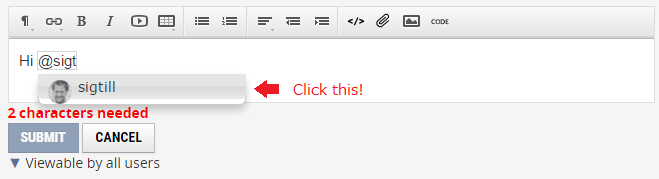
Hi @sigtill, try clicking a username in the list that appears when you type @ and first some characters of the user name.


sigtill
Supporter
Forum|alt.badge.img+25
  • Author
  • Supporter
  • November 1, 2016

I dont get that dropdown-menu, and I can not write @ as @nielsgerrits describes. Using latest chrome


sigtill
Supporter
Forum|alt.badge.img+25
  • Author
  • Supporter
  • November 1, 2016

Also on Firefox and internet explorer I have the same behaviour.


nielsgerrits
VIP
Forum|alt.badge.img+64

Also on Firefox and internet explorer I have the same behaviour.

Chrome & IE work like a charm here. I use AdBlock & Ghostery in FF. When these are activated things are reacting different but it does work. But I do not get (instant) email when mentioned. Not sure if that is how it should work but how I expected it.


takashi
Celebrity
  • November 1, 2016

Also on Firefox and internet explorer I have the same behaviour.

Usually I'm using Chrome on Windows, and it works fine. Strange...


mygis
Supporter
Forum|alt.badge.img+14
  • Supporter
  • June 8, 2017

I agree @sigtill that sometimes it doesn't work. Perhaps it is because it needs to go online to fetch the suggestions from the server and display them.


mygis
Supporter
Forum|alt.badge.img+14
  • Supporter
  • June 9, 2017

I agree @sigtill that sometimes it doesn't work. Perhaps it is because it needs to go online to fetch the suggestions from the server and display them.

I am using Firefox 53.0.3


sigtill
Supporter
Forum|alt.badge.img+25
  • Author
  • Supporter
  • June 9, 2017

It fails on any device for me, also Android with Chrome and built-in browser. So it seems to be related with the user-account? I see that you can now correctly mention me, @gisinnovationsb


mygis
Supporter
Forum|alt.badge.img+14
  • Supporter
  • June 9, 2017

It fails on any device for me, also Android with Chrome and built-in browser. So it seems to be related with the user-account? I see that you can now correctly mention me, @gisinnovationsb

But you cannot mention me.


Forum|alt.badge.img+2
  • June 9, 2017

@sigtill Try putting any character before the '@' symbol?


e.g.


a space like above

or even better

Hei @sigtill

(sent from Chrome)

Edit: OK I can see in your reply to @gisinnovationsb it did not work


mygis
Supporter
Forum|alt.badge.img+14
  • Supporter
  • June 9, 2017

Perhaps @sigtill you have been added by the admin to an elite group of users that had the "browse for users" turned off accidentally. Or it is like that "sound in the car that would go off eventually" phenomenon.


Forum|alt.badge.img+1
  • June 9, 2017

@sigtill Do you by any chance use an AZERTY keyboard? I have had similar issues in the past and it seems to be resolved when I switch it to QWERTY.


  • June 11, 2017

sigtill,

I encounter the same issue. You can drag and drop a user name in the text editor.


david_r
Celebrity
  • June 12, 2017

I've recently discovered that the @-shortcut only works if you use an english keyboard setup.

Using Windows 10 and Chrome, if that matters.


sigtill
Supporter
Forum|alt.badge.img+25
  • Author
  • Supporter
  • November 28, 2017

I have found a workaround for this - If I change my keyboard from NORWEGIAN to ENGLISH then it works. However when I switch back again it fails. So I have to have ENGLISH keyboard activated to be able to use mentions!


sigtill
Supporter
Forum|alt.badge.img+25
  • Author
  • Supporter
  • November 28, 2017

sigtill,

I encounter the same issue. You can drag and drop a user name in the text editor.

sigtill - test