




Question

How to replicate the summary / preview shown in a new Reader

  • January 11, 2017
  • 3 replies
  • 22 views

ottadini
Supporter
Forum|alt.badge.img+5

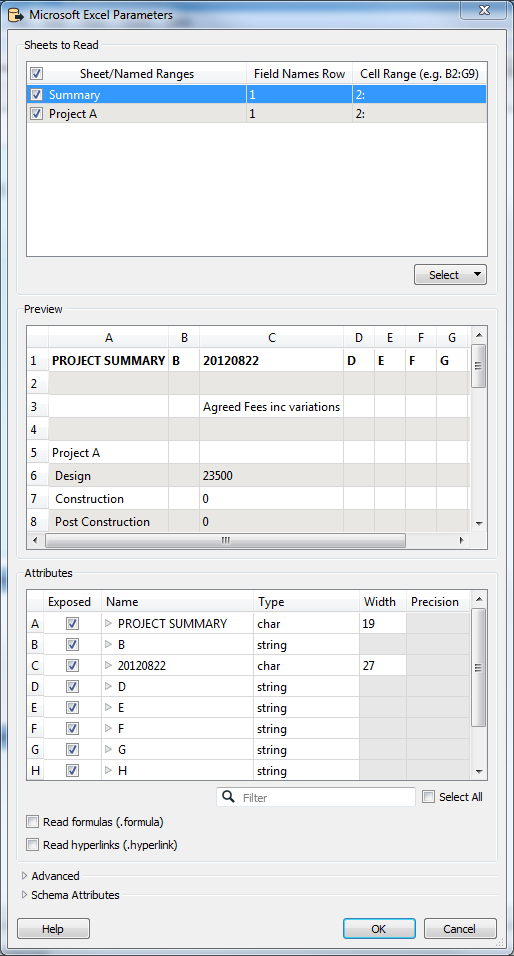
When I add a new Reader, e.g., Excel, select a file, and then open the 'parameters' dialog, there's a summary showing 1. Sheets to Read, 2. Preview (of selected sheet), and 3. Attributes (of selected sheet). I want to replicate that in a workflow... how to do it?

I just want to know how to get this information from the file, I don't need to know how to format it and all that.

This post is closed to further activity.
It may be an old question, an answered question, an implemented idea, or a notification-only post.
Please check post dates before relying on any information in a question or answer.
For follow-up or related questions, please post a new question or idea.
If there is a genuine update to be made, please contact us and request that the post is reopened.

3 replies

pratap
Contributor
Forum|alt.badge.img+12
  • Contributor
  • January 12, 2017

Hi,

Unable to understand your question. Do you want to add same reader twice?


david_r
Celebrity
  • January 12, 2017

Try using the "Schema (any format)" reader.


itay
Supporter
Forum|alt.badge.img+18
  • Supporter
  • January 12, 2017

Yes if you are only interested in the schema (data model) the schema reader is the way to go.





