Solved

GEODATABASE_SDE reads lines as IFMELine + IFMEArc

  • January 15, 2020
  • 4 replies
  • 48 views

Hi, I used to read my ESRI database with the ArcSDE Legacy Reader which worked fine. When I switched to the new GEODATABASE_SDE reader, my ESRI lines that have a cross over that looks like an arc are now read as an IFMEPatch which is a combination of an IFMELine and an IFMEArc.


With the Leagacy reader the same line is read as a Line and not as a path of a line and an arc. Is there a way to force it to be read as a line as before? If not possible what would be the best way to convert it as a line?


Thanks,

Simon
Best answer by bwn

Had the same issue when converting my Workspace from the Legacy SDE Reader.

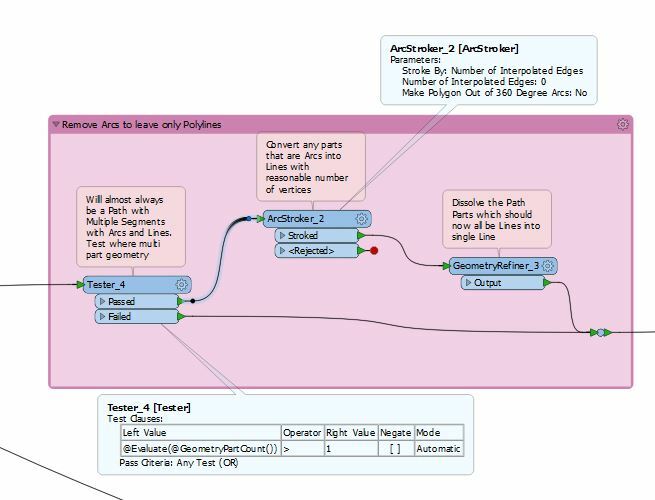
Tried a few variations, but here is what seemed to work best. Many thanks to @takashi for pointing me in the right direction on how to dissolve Paths with GeometryRefiner! I had previously been using PathSplitter and LineCombiner as suggested below, but replacing it with GeometryRefiner works much better and handles it with less errors.

This post is closed to further activity.
It may be an old question, an answered question, an implemented idea, or a notification-only post.
Please check post dates before relying on any information in a question or answer.
For follow-up or related questions, please post a new question or idea.
If there is a genuine update to be made, please contact us and request that the post is reopened.

4 replies

erik_jan
Contributor
Forum|alt.badge.img+26
  • Contributor
  • January 15, 2020

Have you tried the GeometryCoercer transformer to set it to fme_line?

Hope that helps.


Forum|alt.badge.img+2
  • January 16, 2020

@simonbelletete I think you'll have to use the PathSplitter, ArcStroker and LineCombiner to rejoin all the segments.

example workspace (2019.2): pathstroker.fmw


@simonbelletete I think you'll have to use the PathSplitter, ArcStroker and LineCombiner to rejoin all the segments.

example workspace (2019.2): pathstroker.fmw

ArcStroker + GeometryRefiner works too.


bwn
Evangelist
Forum|alt.badge.img+26
  • Evangelist
  • Best Answer
  • January 17, 2020

Had the same issue when converting my Workspace from the Legacy SDE Reader.

Tried a few variations, but here is what seemed to work best. Many thanks to @takashi for pointing me in the right direction on how to dissolve Paths with GeometryRefiner! I had previously been using PathSplitter and LineCombiner as suggested below, but replacing it with GeometryRefiner works much better and handles it with less errors.