


Solved

Fanout to xlsw

  • February 6, 2020
  • 2 replies
  • 15 views

nath
Contributor
Forum|alt.badge.img+7

Hi,

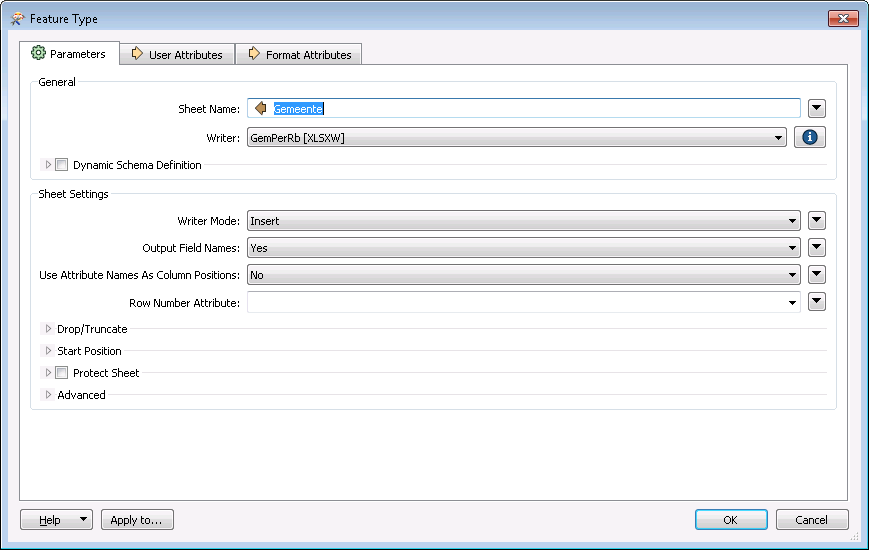
Im trying to write data to an xlsw writer where i want for each partner a seperate excel file with a sheet for each municipality.

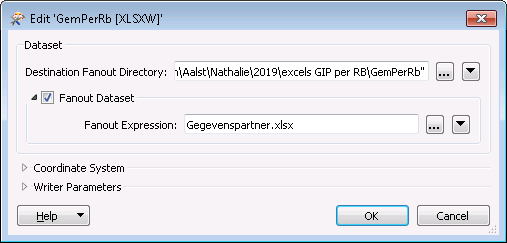
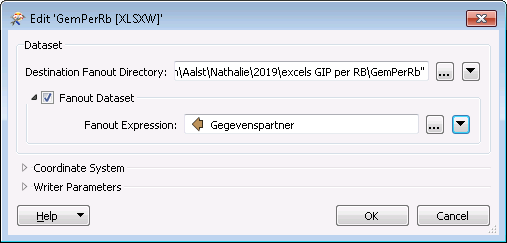
So i tried to create a writer where i set my sheet name to an variabel attribute (gemeente) and then by the fanout option i tried the variabel attribute "gegevenspartner". But is doesn't work, what am i doing wrong?
Best answer by becchr

hi @nath, does it work if you put "@Value(Gegevenspartner).xlsx" as fanout expression? I think the extension is important

This post is closed to further activity.
It may be an old question, an answered question, an implemented idea, or a notification-only post.
Please check post dates before relying on any information in a question or answer.
For follow-up or related questions, please post a new question or idea.
If there is a genuine update to be made, please contact us and request that the post is reopened.

2 replies

becchr
Influencer
Forum|alt.badge.img+33
  • Influencer
  • Best Answer
  • February 6, 2020

hi @nath, does it work if you put "@Value(Gegevenspartner).xlsx" as fanout expression? I think the extension is important


nath
Contributor
Forum|alt.badge.img+7
  • Author
  • Contributor
  • February 6, 2020

hi @nath, does it work if you put "@Value(Gegevenspartner).xlsx" as fanout expression? I think the extension is important

Yes! Now it works! I had typed xlsx in the expression this instead of @value