


Question

Esri ArcGIS Portal Reader

  • May 15, 2018
  • 8 replies
  • 135 views

Forum|alt.badge.img+1

I am trying to connect to a hosted feature service in our GIS Portal. I am receiving the following error:

..."Check your credentials and try again. The error code from the server was '400' and the message was: 'Unable to generate token.' A fatal error has occurred. Check the logfile above for details"...

I am using our fully qualified domain name with /sharing/rest/generateToken with our service account credentials.

Ideas??

Thanks,

--gary

This post is closed to further activity.
It may be an old question, an answered question, an implemented idea, or a notification-only post.
Please check post dates before relying on any information in a question or answer.
For follow-up or related questions, please post a new question or idea.
If there is a genuine update to be made, please contact us and request that the post is reopened.

8 replies

rahulsharma
Safer
Forum|alt.badge.img+10
@bowlesg

Could you clarify if you are using Authentication type "Generate Token" or "NTLM"


Forum|alt.badge.img+1
  • Author
  • May 15, 2018

Generate Token.


rahulsharma
Safer
Forum|alt.badge.img+10

It appears that ArcGIS portal might be set up to use NTLM Authentication. Try NTLM and use your Domain account


Forum|alt.badge.img+1
  • Author
  • May 15, 2018

I tried the NTLM using domain account and received an error as well. We are setup using ADFS for our authentication to Portal with our AD.


rahulsharma
Safer
Forum|alt.badge.img+10

Hi @bowlesg

It appears this issue requires further investigation (investigating Logfiles). Would you please submit a report here https://www.safe.com/support/report-a-problem/

Thanks


Forum|alt.badge.img
  • August 1, 2018

Any other ideas on this question? I'm trying to connect to our internal portal and continue to receive the following error:

Failed to obtain any schemas from reader 'ARCGISPORTALFEATURES' from 1 datasets. This may be due to invalid datasets or format accessibility issues due to licensing, dependencies, or module loading.

Using Portal 10.6.1 and FME Desktop 2018.0.0.0


runneals
Supporter
Forum|alt.badge.img+29
  • Supporter
  • August 3, 2018

Any other ideas on this question? I'm trying to connect to our internal portal and continue to receive the following error:

Failed to obtain any schemas from reader 'ARCGISPORTALFEATURES' from 1 datasets. This may be due to invalid datasets or format accessibility issues due to licensing, dependencies, or module loading.

Using Portal 10.6.1 and FME Desktop 2018.0.0.0

Is your service shared to the organization/everyone or private?

pingotech
Contributor
Forum|alt.badge.img
  • Contributor
  • June 3, 2019

@bowlesg, @rahulsharma


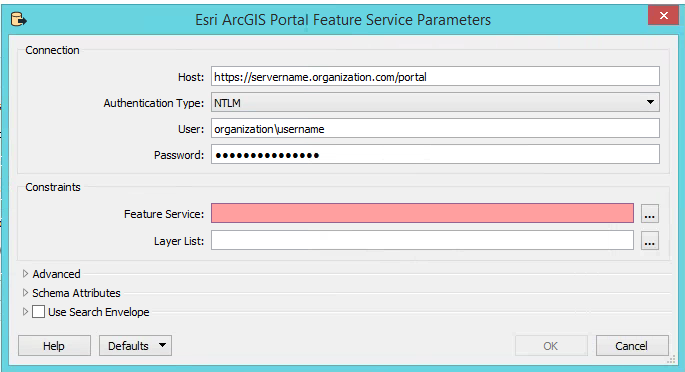
I was having this issue and because I wasn't sure how my IT department set up our ArcGIS portal, I initially assumed the authentication type was "Generate Token". By switch the authentication type to "NTLM" I was able to connect. Below shows an example of what worked for me: