

Question

DWG writer text size issue

  • March 4, 2020
  • 4 replies
  • 42 views

Forum|alt.badge.img+1

Hello,

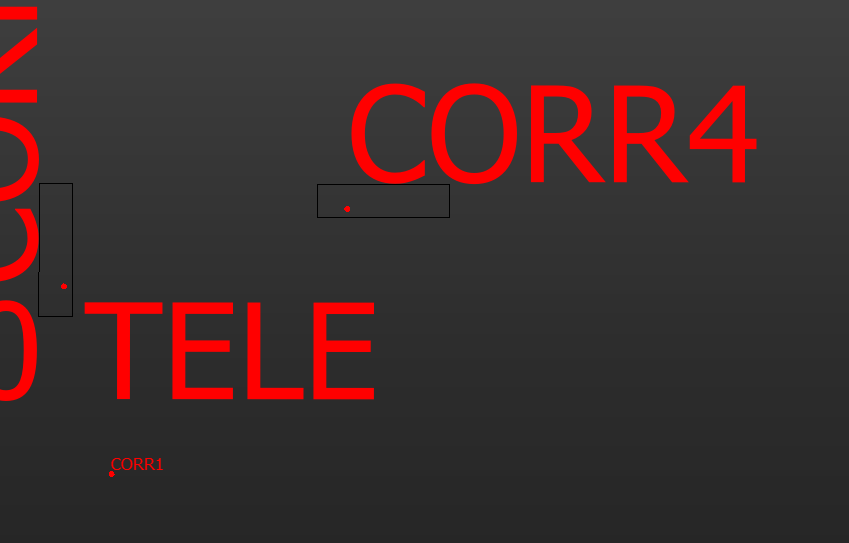
I am performing a simple translation that reads in a building DWG file, updates a single attribute (room number), and overwrites the same DWG it read in with the updated attribute. The issue i am having has nothing to do with the translation i am performing but the labels in the resulting DWG. Some of the labels are written out with a text size that is much larger than the original DWG. I have inspected the original drawings text size for these labels, and they are 0.38 but the resulting label text size jumps to 3.06. This only happens on labels that are surrounded by polygon inserts. The labels without these inserts come through just fine. See the attached image where the label for "CORR1" is just fine but "CORR4" is too large but has a polygon insert around it. I have also noticed that the resulting entity handle for this label changes after being written out. Also, when i redirect the writer to fme data inspector, everything appears just as it should.

I am puzzled as to what is happening or what a solution may be. I am hoping someone here can help me to figure this out.

This post is closed to further activity.
It may be an old question, an answered question, an implemented idea, or a notification-only post.
Please check post dates before relying on any information in a question or answer.
For follow-up or related questions, please post a new question or idea.
If there is a genuine update to be made, please contact us and request that the post is reopened.

4 replies

erik_jan
Contributor
Forum|alt.badge.img+26
  • Contributor
  • March 4, 2020

Since you have a well documented case with data and a workspace that can be reproduced, I would send this to Safe Support.

They are better equipped to solve this for you.


Forum|alt.badge.img+1
  • Author
  • March 4, 2020

Since you have a well documented case with data and a workspace that can be reproduced, I would send this to Safe Support.

They are better equipped to solve this for you.

Thanks for the quick reply @erik_jan

Hmmm, that's what I thought I was doing. I follow the link you provided and it lead me to the support forum (Ask a Question) where I posted this question. What am I missing?


erik_jan
Contributor
Forum|alt.badge.img+26
  • Contributor
  • March 4, 2020

Thanks for the quick reply @erik_jan

Hmmm, that's what I thought I was doing. I follow the link you provided and it lead me to the support forum (Ask a Question) where I posted this question. What am I missing?

Sorry for the misunderstanding.

On that support page you have the issue to "Report a problem". That gets you to the Safe Software support team.

The question here is listed on the FME User Forum.


Forum|alt.badge.img+1
  • Author
  • March 4, 2020

Sorry for the misunderstanding.

On that support page you have the issue to "Report a problem". That gets you to the Safe Software support team.

The question here is listed on the FME User Forum.

I see now, thank you


