Question

Unexpected Output with the FeatureMerger

  • December 28, 2016
  • 8 replies
  • 92 views

Hi World of FME,

I am a newbie with FME but I already worked a lot with the FeatureMerger. But at the moment I have a problem with an output I cannot really explain. In the screenshot you see the attribute tables, that enter the FeatureMerger as Requestor und Supplier. Also you see the transformer output I expect and below you see the real output: No feature could be merged and I have no idea what the problem is.

Thank you for answers or hints,

Felix

This post is closed to further activity.
It may be an old question, an answered question, an implemented idea, or a notification-only post.
Please check post dates before relying on any information in a question or answer.
For follow-up or related questions, please post a new question or idea.
If there is a genuine update to be made, please contact us and request that the post is reopened.

8 replies

takashi
Celebrity
  • December 28, 2016

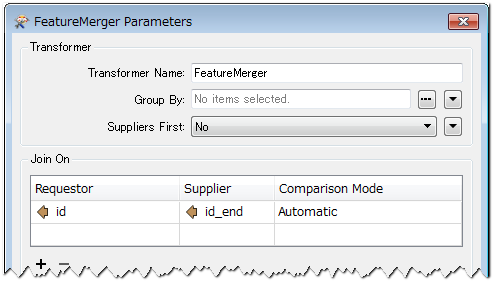
Hi @felixderglueckl, I believe that the FeatureMerger works as expected. Set 'id' to the 'Join On' for Requestor, set 'end_id' to the 'Join On' for Supplier and NOT set 'Group By', like this screenshot.


Hi @felixderglueckl, I believe that the FeatureMerger works as expected. Set 'id' to the 'Join On' for Requestor, set 'end_id' to the 'Join On' for Supplier and NOT set 'Group By', like this screenshot.

Hi @takashi, thank you for your answer.


I did it exactly like that and unfortunately it does not work :(


takashi
Celebrity
  • December 28, 2016
Hi @takashi, thank you for your answer.


I did it exactly like that and unfortunately it does not work :(


Strange. Check if your workspace has any difference from this simplified demo workspace (FME 2016.1.3): demo.fmwt


nielsgerrits
VIP
Forum|alt.badge.img+66
Hi @takashi, thank you for your answer.


I did it exactly like that and unfortunately it does not work :(


What version FME @felixderglueckl

itay
Supporter
Forum|alt.badge.img+18
  • Supporter
  • December 28, 2016

is it possible that the attribute values on which then join is done are not the same ? Spaces in the values can cause this kind of behviour.


takashi
Celebrity
  • December 28, 2016
Hi @takashi, thank you for your answer.


I did it exactly like that and unfortunately it does not work :(


You have set 'Yes' to the 'Suppliers First' parameter, but I don't think the option can be applied in this workflow. Probably it's the reason for the unexpected result.


You have set 'Yes' to the 'Suppliers First' parameter, but I don't think the option can be applied in this workflow. Probably it's the reason for the unexpected result.


Actually that was my fault @takashi Thank you very much. It did work! :)


david_r
Celebrity
  • January 3, 2017

Also try setting the comparison mode to "String", I've experienced some unexpected behavior in older versions of FME when the attributes to merge on looked like very long numbers.