Question

Tiler splits up areas - how to get them back?

  • January 21, 2016
  • 7 replies
  • 71 views

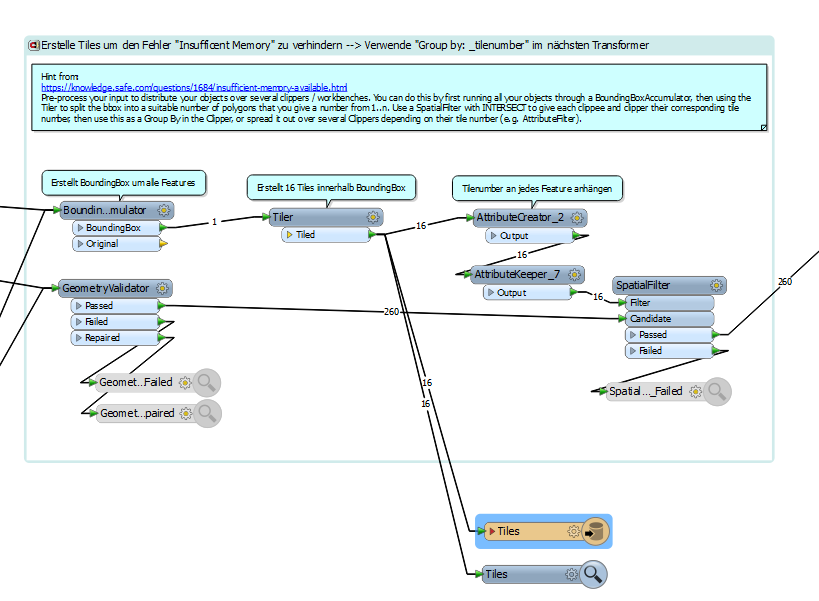
I have a script which I had to split up in tiles because the error "insufficent Memory" appeared for the areaonareaoverlay transformer.


The script is calculating the area of different surface types per parcel. The tiles now split up some of the parcels and the statistic is not calculated correctly for the areas which are located in the same parcel but in two different tiles. I tried to fix the problem by adding the duplicate-remover, dissolver or Aggregate but it did not work. Any Solutions?

This post is closed to further activity.
It may be an old question, an answered question, an implemented idea, or a notification-only post.
Please check post dates before relying on any information in a question or answer.
For follow-up or related questions, please post a new question or idea.
If there is a genuine update to be made, please contact us and request that the post is reopened.

7 replies

redgeographics
VIP
Forum|alt.badge.img+63

The Dissolver, set to group by a unique identifier (parcel number for example) should do the trick.


Forum|alt.badge.img+7

I would try to create tiles in a parent model so that every tile contains 1 or more complete parcels.


In the child model, you can filter those buildings that are located in this particular parcel and just keep working parcel per parcel. Doing so will result in an easier model since you can calculate the statistics directly with the correct data.


However keep in mind that, if there are a lot of parcels, the time necessary to start a new workbench might influence the time to run the model drastically.

  • Author
  • January 21, 2016

The Dissolver, set to group by a unique identifier (parcel number for example) should do the trick.

I tried this before, but it did not work..


redgeographics
VIP
Forum|alt.badge.img+63

I tried this before, but it did not work..

Can you elaborate? What happened exactly?


gio
Contributor
Forum|alt.badge.img+15
  • Contributor
  • January 21, 2016

create a grid the same size as your intended tiler.

Filter out all parcels wich are crosed by this grid.

Use tiler on non-crossed objects.

Process crossed objects separately.

You can also assign the crossed objects to a tiel by for instance testing for inside point in tile.

If u prefer straight tiling, you can recontsruct objects by dissolving only the split objects (to save time) grouped by tilerow,tilecolumn and its unique id.

Full tiling can make it possible to use parallelprocessing btw.


erik_jan
Contributor
Forum|alt.badge.img+26
  • Contributor
  • January 21, 2016

I noticed some German annotation.

Can you use another dividing area (like counties "Kreis") to divide the dataset in a way that parcels do not cross the subdivisions of your dataset?

That would make it a lot easier.


fmelizard
Safer
Forum|alt.badge.img+22
  • Safer
  • January 22, 2016

Worth trying as well on 64 bit FME if you have a machine with lots of memory.