


Question

,Table cell based on value

  • September 15, 2016
  • 2 replies
  • 35 views

ingalla
Contributor
Forum|alt.badge.img+10

I am trying to change the cell value in a table which is being sent via email based on the attribute value. If the number of dwellings is 1 or ore then the number of dwellings value should be in the table cell, but if the value is zero or null then the cell should display data is null in red font.

We currently have

<td>@Value(DWELLINGS)</td> and this works but not when the number is null or 0

Any ideas how to do this would be appreciated

,


This post is closed to further activity.
It may be an old question, an answered question, an implemented idea, or a notification-only post.
Please check post dates before relying on any information in a question or answer.
For follow-up or related questions, please post a new question or idea.
If there is a genuine update to be made, please contact us and request that the post is reopened.

2 replies

redgeographics
VIP
Forum|alt.badge.img+62
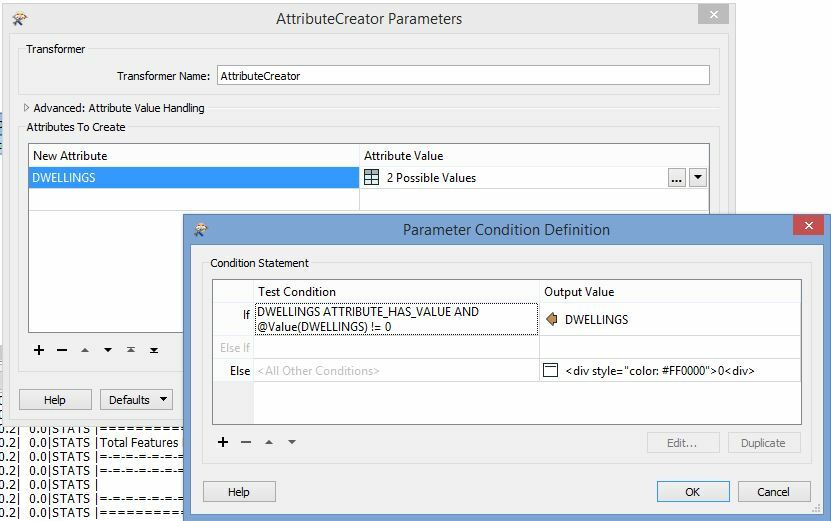
You can use a conditional expression in the AttributeManager or AttributeCreator to do this. So if DWELLINGS has a value and is not 0 then use that, otherwise insert a bit of HTML code that places a red 0


(that html could possibly be neater, I'm not a web designer...)


redgeographics
VIP
Forum|alt.badge.img+62
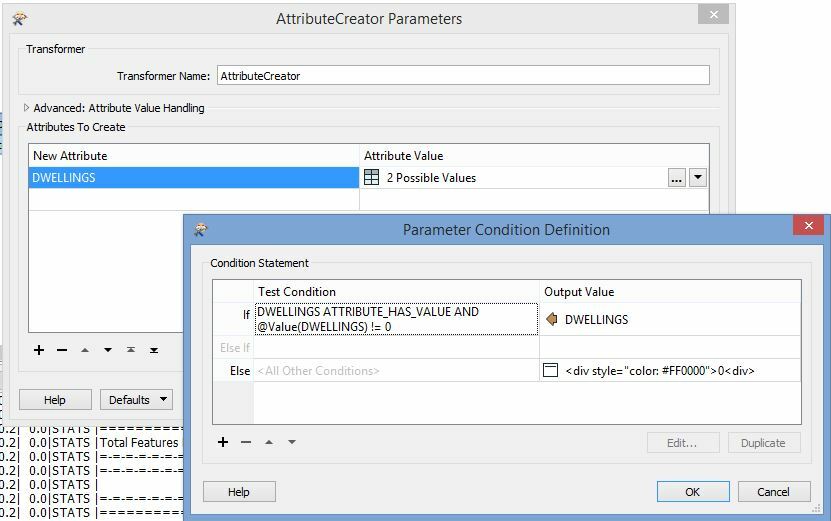
You can use a conditional expression in the AttributeManager or AttributeCreator to do this. So if DWELLINGS has a value and is not 0 then use that, otherwise insert a bit of HTML code that places a red 0


(that html could possibly be neater, I'm not a web designer...)