Solved

Point to line

  • Sep 4, 2023 6:56 AM UTC
  • 5 replies
  • 234 views

bayram
Contributor
Forum|alt.badge.img+7

good week everyone


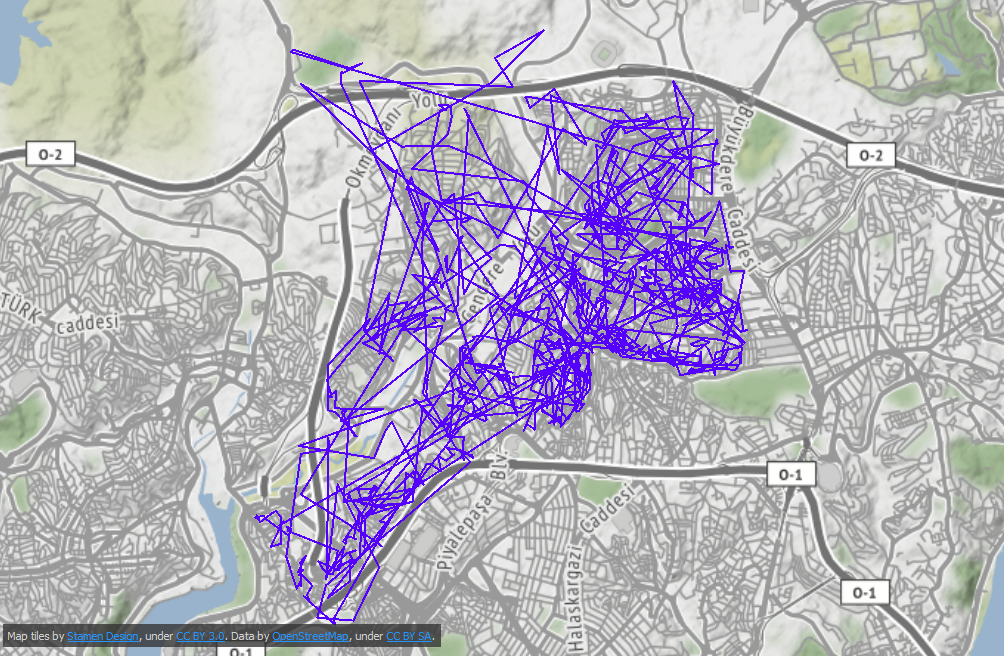
There is a yield in point format. I want to produce a line from these points. There is a method I used before, but I did not get very good results. As an attribute, each point has a shooting time. Can I create a line using this shooting time?

Best answer by nielsgerrits

Hello Nielsgerrits


Thank you very much for your answer. If you are available, could you help me if I send you my file?


Happy I could help :)


Upon further inspection I found the PreviousRecording class with the tracks. You could split the tracks on segment length (Chopper 2 vertices, LenghtCalclulator, Tester, LineCombiner) or elapsed time between points (AttributeCreator with Adjacent Feature Attributes enabled, calculate DateTimeDiff (@DateTimeDiff(@Value(RecordedAt),@Value(feature[-1].RecordedAt),seconds)) between points, create a new group if elapse time is greater then 10 seconds.


View original
This post is closed to further activity.
It may be an old question, an answered question, an implemented idea, or a notification-only post.
Please check post dates before relying on any information in a question or answer.
For follow-up or related questions, please post a new question or idea.
If there is a genuine update to be made, please contact us and request that the post is reopened.

5 replies

nielsgerrits
VIP
Forum|alt.badge.img+67

Not sure if I understand what you are after, but I think you have trouble with the order of the records and the line not being build chronologically? I think you first need to reformat the date field (RecordedAt) to fme datetime using the DateTimeConverter, then you will be able to use a Sorter to get the order right and then build the line.


For creating a line from points you can use a LineBuilder or a VertexCreator.


bayram
Contributor
Forum|alt.badge.img+7
  • Author
  • Contributor
  • Sep 4, 2023 7:27 AM UTC

Not sure if I understand what you are after, but I think you have trouble with the order of the records and the line not being build chronologically? I think you first need to reformat the date field (RecordedAt) to fme datetime using the DateTimeConverter, then you will be able to use a Sorter to get the order right and then build the line.


For creating a line from points you can use a LineBuilder or a VertexCreator.

Hello Nielsgerrits


Thank you very much for your answer. If you are available, could you help me if I send you my file?


nielsgerrits
VIP
Forum|alt.badge.img+67

Hello Nielsgerrits


Thank you very much for your answer. If you are available, could you help me if I send you my file?


Sure :)


LineBuilderSample(2021)_1 

LineBuilderSample(2021)_2 


bayram
Contributor
Forum|alt.badge.img+7
  • Author
  • Contributor
  • Sep 4, 2023 8:02 AM UTC

Hello Nielsgerrits


Thank you very much for your answer. If you are available, could you help me if I send you my file?


thank you very much it helped a lot with some minor fixes I got a very good result


nielsgerrits
VIP
Forum|alt.badge.img+67

Hello Nielsgerrits


Thank you very much for your answer. If you are available, could you help me if I send you my file?


Happy I could help :)


Upon further inspection I found the PreviousRecording class with the tracks. You could split the tracks on segment length (Chopper 2 vertices, LenghtCalclulator, Tester, LineCombiner) or elapsed time between points (AttributeCreator with Adjacent Feature Attributes enabled, calculate DateTimeDiff (@DateTimeDiff(@Value(RecordedAt),@Value(feature[-1].RecordedAt),seconds)) between points, create a new group if elapse time is greater then 10 seconds.