Question

merge date columns

  • January 8, 2015
  • 3 replies
  • 36 views

Forum|alt.badge.img
Hi all,


I am reading a number of records from an Oracle database. When using FeatureMerger on these, I find that the resulting features have NULL values for attributes DATE1, DATE2, etc., while the attributes DATE1.full, DATE2.full have been merged correctly. Is there a simpler solution than exposing the DATEn.full attributes and converting them to the DATEn attributes? (There are a LOT of such date attributes.)


Any help greatly appreciated.


Regards,


Steinar



This post is closed to further activity.
It may be an old question, an answered question, an implemented idea, or a notification-only post.
Please check post dates before relying on any information in a question or answer.
For follow-up or related questions, please post a new question or idea.
If there is a genuine update to be made, please contact us and request that the post is reopened.

3 replies

david_r
Celebrity
  • January 8, 2015
Hi,


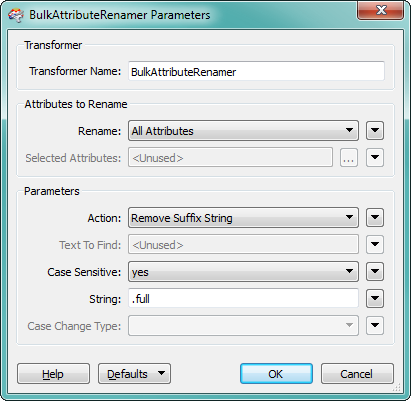
the easiest is probably to use a BulkAttributeRenamer:


this will rename e.g. DATE1.full to DATE1, while preserving the value from DATE1.full.


David

david_r
Celebrity
  • January 8, 2015
Btw, you do not have to expose any attributes for this to work. Just add the BulkAttributeRemover right after the reader and you should be all set.


David

Forum|alt.badge.img
  • Author
  • January 8, 2015
Thanks David,


It seems that FeatureMerger (for some strange reason) refuses to merge other date attributes than the original .full ones, so I need to place the BulkAttributeRenamer after FeatureMerger, and then reformat the attributes from the YYYYMMDDHHMMSS format to the YYYYMMDD format I require. I suppose DateFormatter should do the trick.You are right in that I do not have to expose the attributes - learned something new today.


Steinar