Question

How to display the closest ascii pixel to a poly line

  • June 15, 2015
  • 4 replies
  • 57 views

Hi guys,


I am having trouble with spatially querying between an Ascii file and a polyline (shapefile).


What i want to do is find the cloest pixel point in the ascii file and insert it into a new attribute column within the shapefile polyline


The ascii files has theses attributes "Row & Column" eg 1182, 1657 - "Ground Location" eg co-ordinates - "Band 0 (REAL64)" eg 19.2234.


ao what i want is the closest band attribute to be inserted into the shape file as a new attribute.


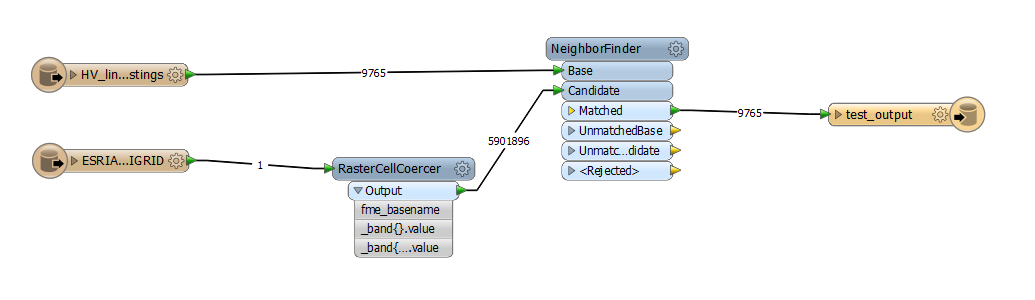
I have tried to use the neighborfinder but it doesn't seem to want to match anything.


Does anyone no how to do this?


Cheers


Trent

This post is closed to further activity.
It may be an old question, an answered question, an implemented idea, or a notification-only post.
Please check post dates before relying on any information in a question or answer.
For follow-up or related questions, please post a new question or idea.
If there is a genuine update to be made, please contact us and request that the post is reopened.

4 replies

takashi
Celebrity
  • June 16, 2015
Hi Trent,


The RasterCellCoercer can be used to transform every cell into point than has the band value as an attribute. You can then find the closest point from the line with the NeighborFinder.


Takashi

  • Author
  • June 16, 2015
Hi Takashi,


thank you for that bit of info, it worked to a point. I can get all the relevant info  to come through from the neighborfinder eg distance, closest x & y etc but for some reason the raster attributes don't want to flow through is there any reason for this.


I have included a link through to the sample fmw file and sample data if that helps?


https://www.dropbox.com/sh/xyel5fsj0kouz9f/AAB6GJM2F1tFaq9uQNzaYk61a?dl=0


Any help as always much appreciated.


Cheers


Trent

takashi
Celebrity
  • June 17, 2015
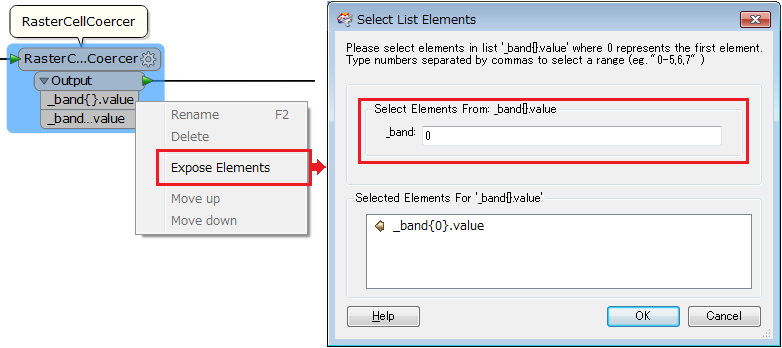
The "_band{}.value" is a list attribute that contains band values as its elements. You will have to get your required element value when writing it into a destination file. The raster read from an ascii grid file has just one band, so the required value will be stored in the first element of the list. i.e. "_band{0}.value".


Right-click on the list name and expose the element. Then, you can map the exposed element "_band{0}.value" to an attribute of the writer feature type.


Alternatively you can change a list element to non-list attribute by a transformer such as ListIndexer, AttributeRenamer etc.

  • Author
  • June 17, 2015
that's awesome Takashi, it work's a treat :) thanks alot for your help