Question

Decode clob dd 2 juli revisisted

  • July 3, 2014
  • 4 replies
  • 69 views

gio
Contributor
Forum|alt.badge.img+15
Hi i wanted to post this at a earlier question.


But i thought, giving it more exposere.. ;) (though this might be bad for my ranking in the community ehehehe )


original input:


Sample clob:


<body>


    <h3>32594. * (T) Oslofjorden. Oslo. Sjursøya. Lysbøyer. Nye posisjoner<em> ( Light buoys. New positions).</em></h3>


    <p><strong><strong>Slett</strong></strong> tidligere Efs (T) 09/441/09<br /><em>(<strong><strong>Delete</strong></strong> former Efs (T) 09/441/09)<br /></em>På grunn av utfylling i sjø på nordsiden er følgende sjømerker flyttet:<br /><em>(Due to reclamation north of Sjursøya Mole the following light buoys has been moved):<br /></em>a) Grønn lysbøye fra posisjon (1) til (2):<br /><em>(Green light buoy from position (1) to (2)): <br /></em>WGS84 DATUM<br />(1) 59° 53.223' N, 10° 44.607' E <br />(2) 59° 53.242' N, 10° 44.611' E <br />ED50 DATUM<br />(1) 59° 53.250' N, 10° 44.693' E <br />(2) 59° 53.269' N, 10° 44.697' E <br />NGO DATUM<br />(1) 59° 53.176' N, 10° 44.896' E <br />(2) 59° 53.195' N, 10° 44.900' E <br /><span style="background-color:Yellow;">b) Midlertidig utlagt gul lysbøye fra posisjon (1) til (2):<br /><em>(Temporary yellow light buoy from position (1) to (2)): <br /></em>WGS84 DATUM<br />(1) 59° 53.222' N, 10° 44.637' E <br />(2) 59° 53.246' N, 10° 44.659' E <br />ED50 DATUM<br />(1) 59° 53.249' N, 10° 44.723' E <br />(2) 59° 53.273' N, 10° 44.745' E <br />NGO DATUM<br />(1) 59° 53.175' N, 10° 44.926' E <br />(2) 59° 53.199' N, 10° 44.948' E <br />c) Midlertidig utlagt gul lysbøye fra posisjon (1) til (2):<br /><em>(Temporary yellow light buoy from position (1) to (2)): </em><br />WGS84 DATUM<br />(1) 59° 53.252' N, 10° 44.761' E <br />(2) 59° 53.252' N, 10° 44.777' E <br />ED50 DATUM<br />(1) 59° 53.279' N, 10° 44.847' E <br />(2) 59° 53.279' N, 10° 44.863' E<br />NGO DATUM<br />(1) 59° 53.205' N, 10° 45.050' E <br />(2) 59° 53.205' N, 10° 45.066' E<br /></span>Kart <em>(Charts)</em>: 4, 401, 452. (KildeID 0). (Oslo Havn KF, 1. desember 2010).<br /><br /></p>


  </body>


Extract values form html fragment..


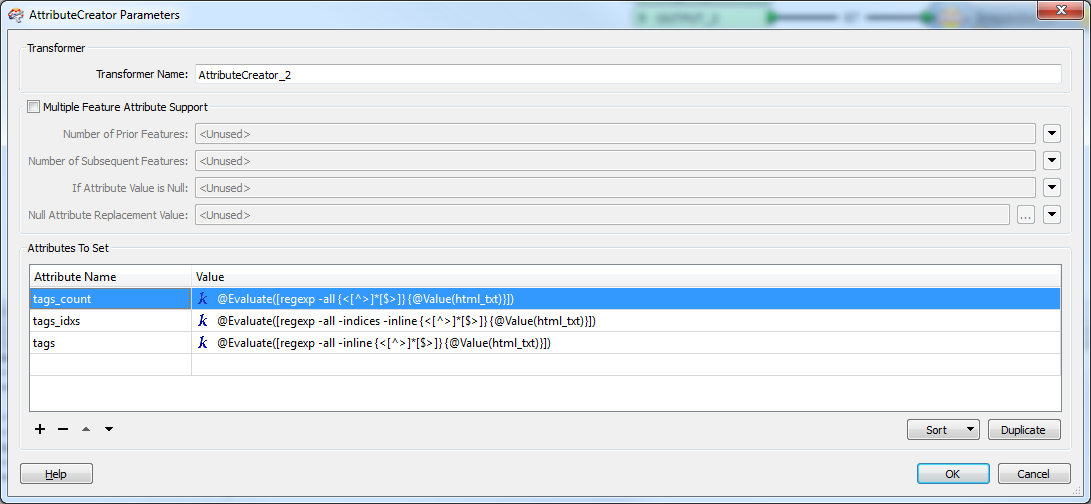
this is for AttributeCreator2.


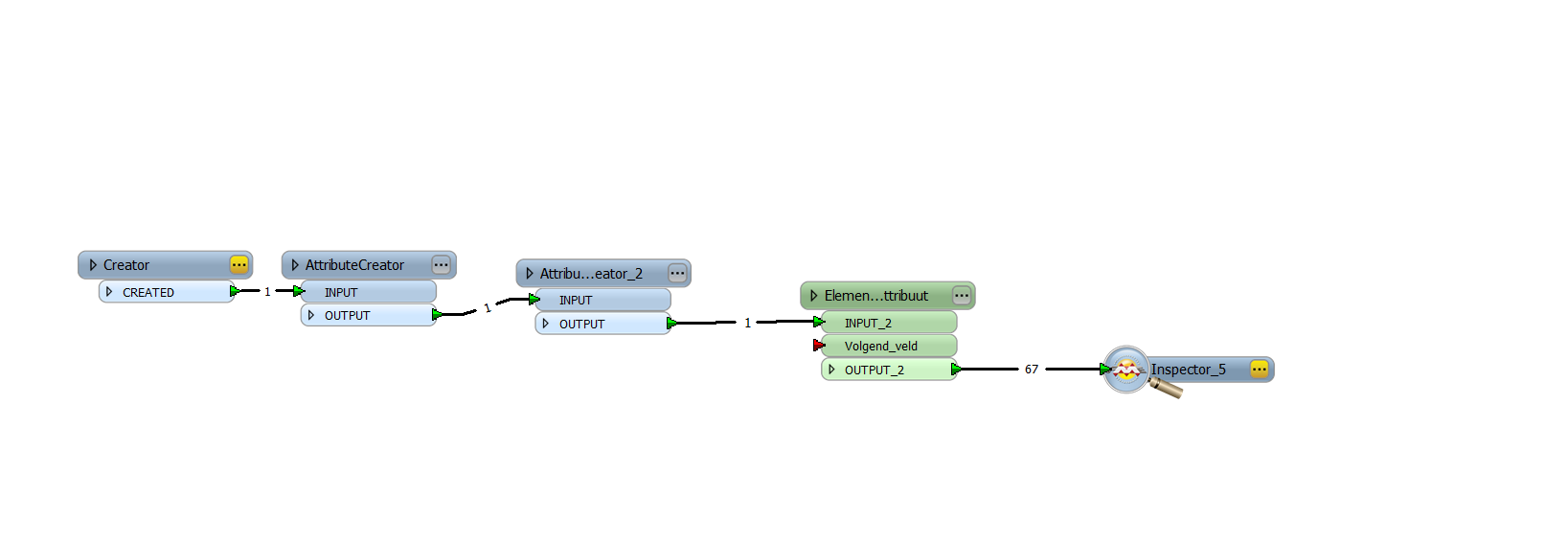
(Creator 1 just reads in the html textfragement posted in aforementioned issue.)
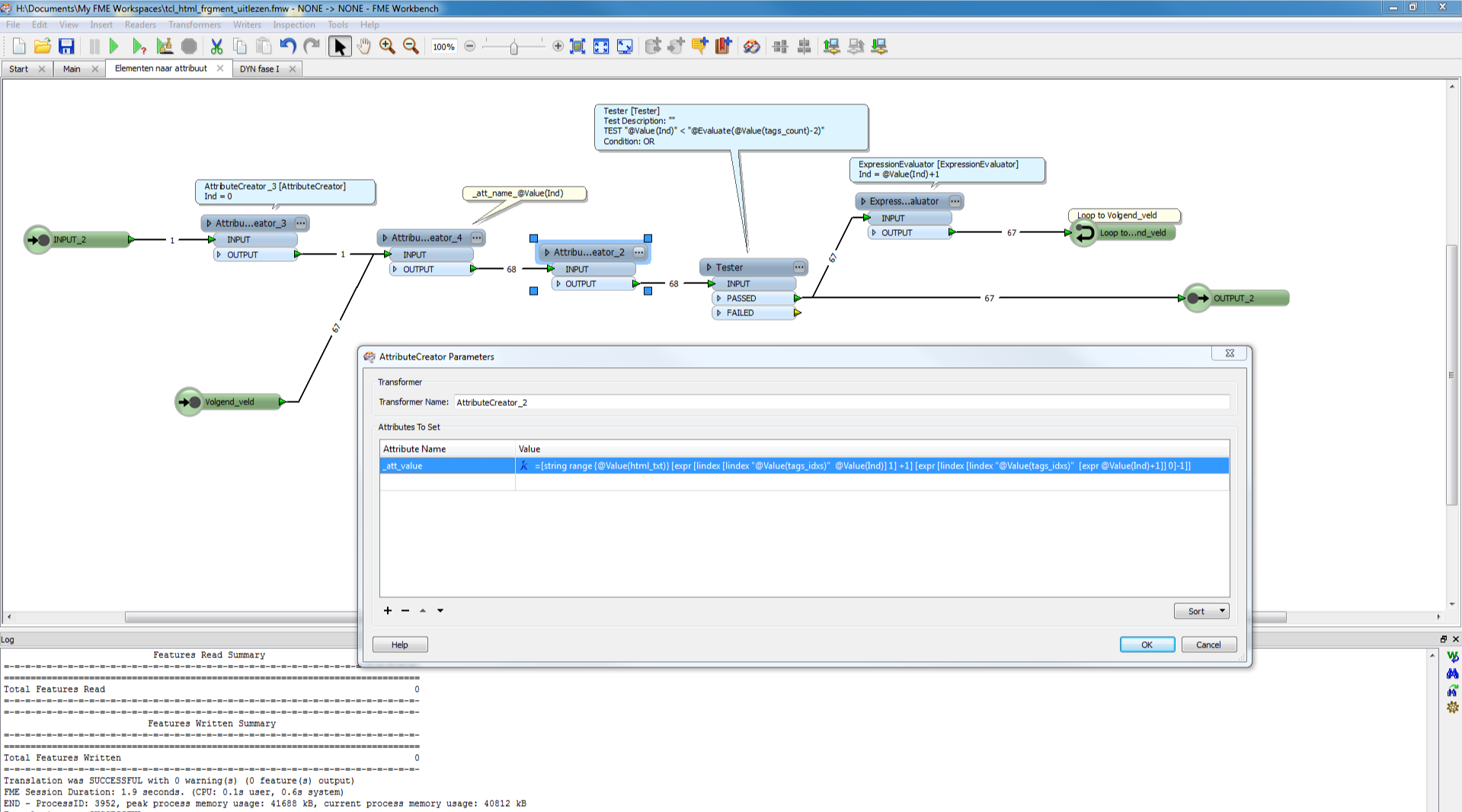


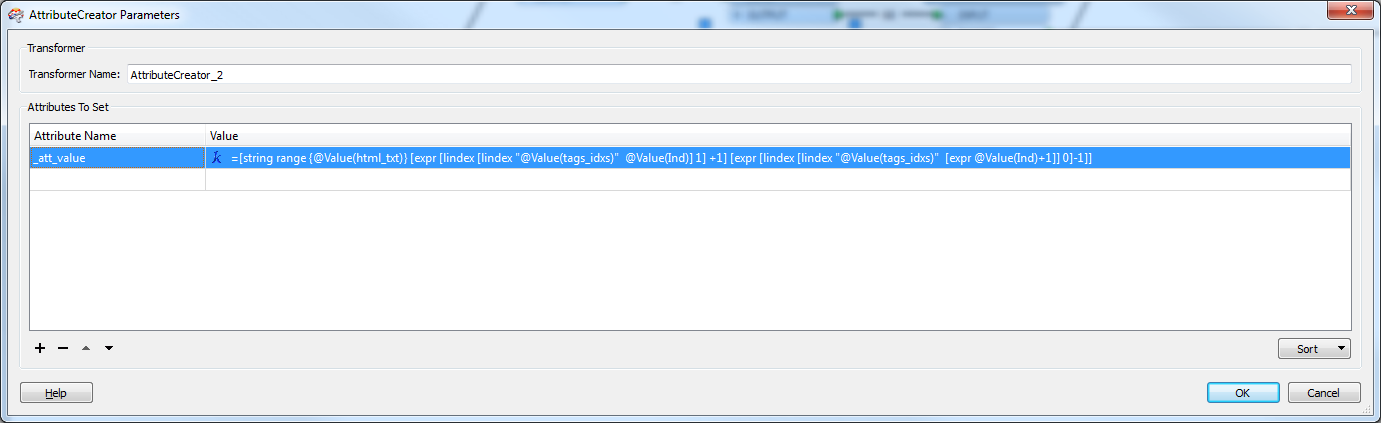
reads better this way....


and result:
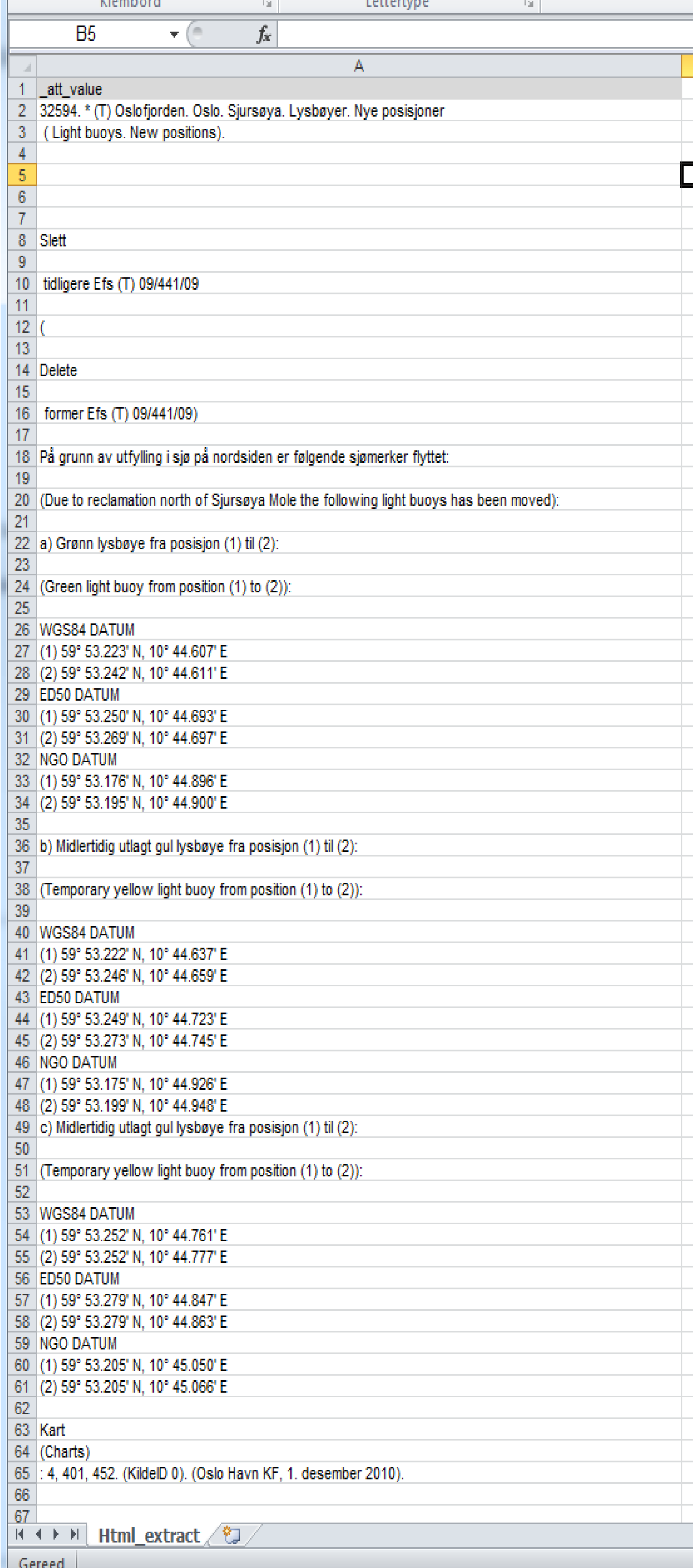


...tcl..simple, elegant and Skickin!


have fun
This post is closed to further activity.
It may be an old question, an answered question, an implemented idea, or a notification-only post.
Please check post dates before relying on any information in a question or answer.
For follow-up or related questions, please post a new question or idea.
If there is a genuine update to be made, please contact us and request that the post is reopened.

4 replies

gio
Contributor
Forum|alt.badge.img+15
  • Author
  • Contributor
  • July 3, 2014
..if u use this


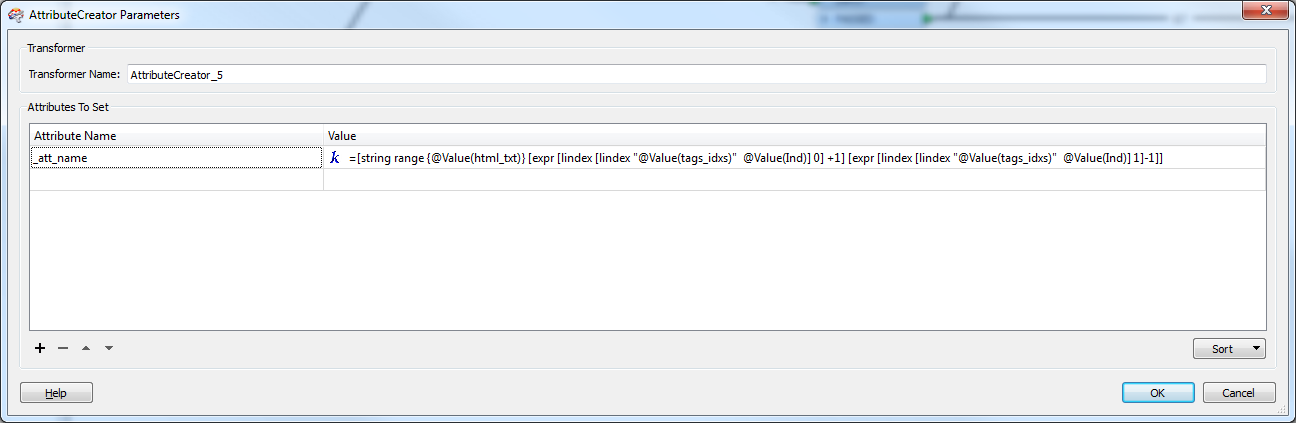
instead of _att_name@Value(ind) () u would get the tags as  _att_name.


Now u need only to collect them..

takashi
Celebrity
  • July 3, 2014
Interesting. Agree that Tcl is simple and elegant.


But FME Transformers could be also simple and elegant as well.


1) Replace every "<br\\s+/>" with a Newline using a StringReplacer (use regex).


2) Replace every "<.+?>" with an empty string using another StringReplacer (use regex).


3) And then, you can split the text at Newline. And explode the list if necessary.


;)

gio
Contributor
Forum|alt.badge.img+15
  • Author
  • Contributor
  • July 3, 2014
Yes, i could do that i know of course.


That method has been pointed out in the original thread as well.


But u must see the disadvatage of that, i presume.


I wanted no replacing or whatsoever mutilation of inputfile...else i might as well get my pen out and use my Universal parser...wich resides in my brain. :)


Anyway, this procedure makes it possible to assign the att_names to the att_values and route it to a  dynamic attributecreator.


Will not be possible if u remove the brackets and their content (tags). 


Your method loses a lot of information along the way too.


<[^>]*> or <[^>]*[$>]  will catch all the tags (try it out in rubulator or an attribute creator), but stringsearcher & co. can't handle this.


While, as u can see, while using regexp in (for instance) an attribute creator can be executed. 


i specifically want to avoid manual exposure...who wants to expose 65 attributes or more??


The point of the show is to show how one can extract ALL hits, identify them and put them in attributes.


U can do this to any text in wich there can be found repetitve or expressible patterns.


Also Stringreplacer and Co, cannot handle more complex regexp strings (see original post)


I therefore conclude that this is by far the superior solution


tags=@Evaluate([regexp -all -inline {<[^>]*[$>]} {@Value(html_txt)}])


count =@Evaluate([regexp () -all {<[^>]*[$>]} {@Value(html_txt ())}])


indexes=@Evaluate([regexp -all -indices -inline {<[^>]*[$>]} {@Value(html_txt)}])


followed by


=[string range {@Value(html_txt)} [expr [lindex [lindex "@Value(tags_idxs)"  @Value(Ind)] 1] +1] [expr [lindex [lindex "@Value(tags_idxs)"  [expr @Value(Ind)+1]] 0]-1]]


(no hardcoding and inputfile can be parametrised)

gio
Contributor
Forum|alt.badge.img+15
  • Author
  • Contributor
  • July 3, 2014
dang...again those mailtos....