Solved

Custom Transformer option for link or embedded Missing

  • June 23, 2022
  • 2 replies
  • 115 views

freddy17
Contributor
Forum|alt.badge.img+8

Hi Everyone, I am trying to link a custom transformer, instead of having it embedded in my workspace.


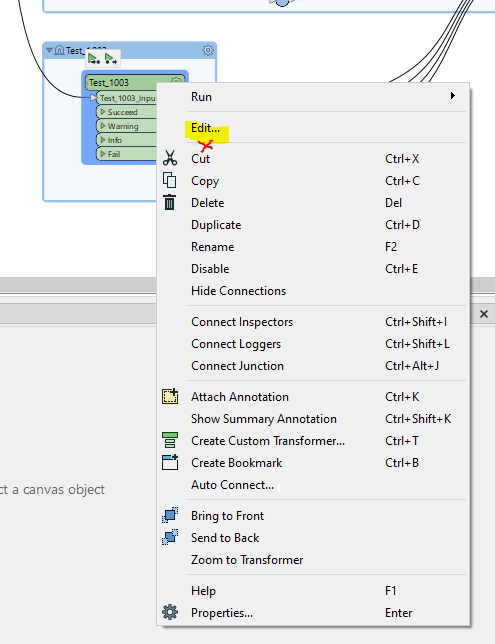
But when I right click on the transformer only "Edit" is shown. The action for embedding or link is not shown (as in the tutorial link below)

Any Idea where I am going wrong? Has the UI changed in FME 2022? I tried following this article:

https://docs.safe.com/fme/html/FME_Desktop_Documentation/FME_Desktop/Workbench/custom_transformer_embedding_linking.htm

CustomTransformer_MissingEmbedAction 

Cheers

Fred

Best answer by freddy17

This has solved the issue. I had to share the path so that the exported Custom Transformer could be found: https://docs.safe.com/fme/html/FME_Desktop_Documentation/FME_Desktop/Workbench/custom_transformer_install.htm


Thanks Tom for pointing to the Export, it helped me find my way

This post is closed to further activity.
It may be an old question, an answered question, an implemented idea, or a notification-only post.
Please check post dates before relying on any information in a question or answer.
For follow-up or related questions, please post a new question or idea.
If there is a genuine update to be made, please contact us and request that the post is reopened.


2 replies

tomfriedl
Contributor
Forum|alt.badge.img+13
  • Contributor
  • June 23, 2022

Have you export your custom tranformer?


freddy17
Contributor
Forum|alt.badge.img+8
  • Author
  • Contributor
  • Best Answer
  • June 23, 2022

This has solved the issue. I had to share the path so that the exported Custom Transformer could be found: https://docs.safe.com/fme/html/FME_Desktop_Documentation/FME_Desktop/Workbench/custom_transformer_install.htm


Thanks Tom for pointing to the Export, it helped me find my way