


Question

Create pivoted table

  • June 6, 2016
  • 2 replies
  • 51 views

jgulmans
Contributor
Forum|alt.badge.img

I am trying to create a table with the following:

I have 3 columns: Office, Time and Average sales. Now what I need to do is set the time values to columns. This is per 5 minutes, so in total 287 columns. The values for these columns need to be the value from the average column. Example:

Old structure

Office Time Average


Store 1 00:00 188


Store 1 00:05 176


Store 2 00:00 195


Store2 00:05 76


....


....

New structure:

Office 00:00 00:05 ... ....


Store 1 188 176


Store 2 195 76

I am currently using FME Desktop 2015.

I hope that someone can help me. I know it is possible by using an attribute filter and attribute creators, but as i was saying, it is 287 columns, and that is a bit much work to attach and fill out the transformers.

Thanks in advance! Jelle

This post is closed to further activity.
It may be an old question, an answered question, an implemented idea, or a notification-only post.
Please check post dates before relying on any information in a question or answer.
For follow-up or related questions, please post a new question or idea.
If there is a genuine update to be made, please contact us and request that the post is reopened.

2 replies

takashi
Celebrity
  • June 6, 2016

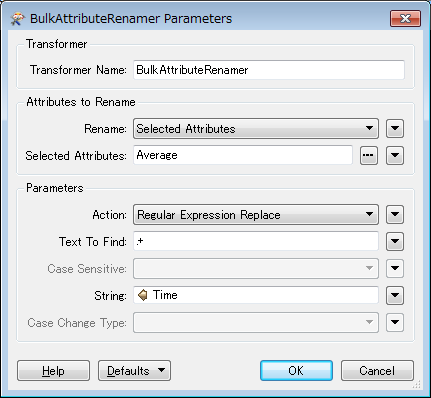
Hi @jgulmans, you can rename "Average" to the value of Time with the BulkAttributeRenamer.

Then, use the Aggregator to merge records for each Office.

  • Group By: Office
  • Mode: Attributes Only
  • Keep Input Attributes: Yes

Finally expose the Time values as attribute names (i.e. 287 columns) by the AttributeExposer, if necessary.


jgulmans
Contributor
Forum|alt.badge.img
  • Author
  • Contributor
  • June 6, 2016

@takashi, thank you for your answer. I managed to make it work!