Question

AutoCAD MText to ArcGIS Annotation

  • May 22, 2013
  • 3 replies
  • 32 views

Forum|alt.badge.img
Hello Guys,


I have two problem transforming MText to ArcGIS annotation.


1) I know that those text with multi line uses "\\P" to denote a carriage return.


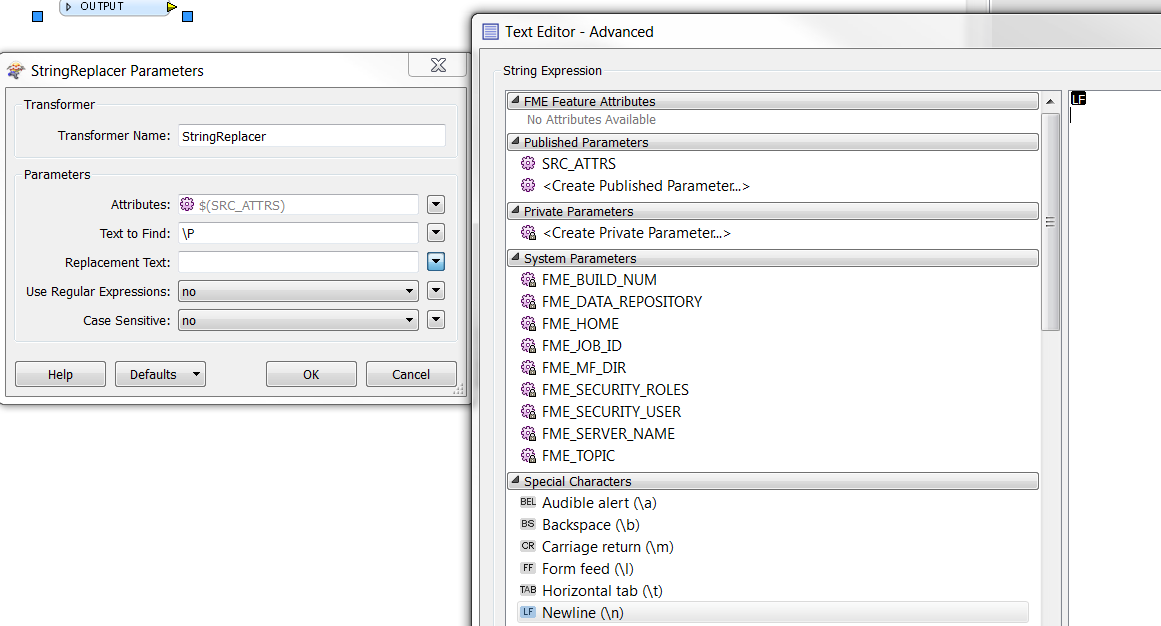
May I know what, what should I replace "\\P" in StringReplacer?


I have tried "\\n", "\\r" and '&vbCrLf'


but it just merely replace \\P with those charactors. 


2) I notice some of the text has mutli line(when displayed) but they do not have "\\P" in them, may I know how do I spot those?


Any help will be grately appreciated.

This post is closed to further activity.
It may be an old question, an answered question, an implemented idea, or a notification-only post.
Please check post dates before relying on any information in a question or answer.
For follow-up or related questions, please post a new question or idea.
If there is a genuine update to be made, please contact us and request that the post is reopened.

3 replies

sigtill
Supporter
Forum|alt.badge.img+25
  • Supporter
  • May 22, 2013
Try the "Special Characters" and Newline (LF) in the StringReplacer


Forum|alt.badge.img
  • Author
  • May 22, 2013
I don't see the  "Special Characters" anywhere.

david_r
Celebrity
  • May 22, 2013
Hi,


take a look at this related question, it might apply to your case as well.


David