




Best Answer

Workspace runner add some Title info on cmd window

  • January 15, 2020
  • 2 replies
  • 27 views

tva
Contributor
Forum|alt.badge.img+13

I'm running the WSR with 7 concurrent processes. Is there a way to add information to the opend cmd window to identify which window belongs to which processes?

I need to terminate from time to time a cmd as it's hanging but I can't identify know which window belongs to which process and I need to guess.

In a batch file I would add TITLE parameter in it. Can something similar be set for WSR?


Below screenshot shows 7 CMD's but no distinction between them is possible:

The provided command is too long to check in the taskmanager. The part to see the difference can't be set on the monitor:

Best answer by erik_jan

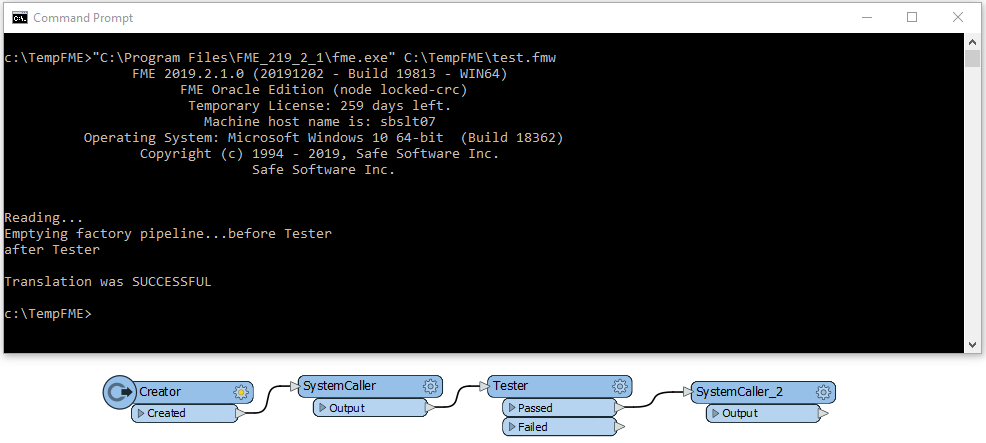
A simple way of doing this is using the SystemCaller and providing the Echo command.

Echo before Tester and Echo after Tester shown in this example:

This post is closed to further activity.
It may be an old question, an answered question, an implemented idea, or a notification-only post.
Please check post dates before relying on any information in a question or answer.
For follow-up or related questions, please post a new question or idea.
If there is a genuine update to be made, please contact us and request that the post is reopened.

2 replies

sigtill
Supporter
Forum|alt.badge.img+25
  • Supporter
  • January 15, 2020

Hi @vat

I would consider looking at FMECloud (https://www.safe.com/fme/fme-cloud/) to run multiple workspaces.

If you have already considered that I would just use FME to create a batch file as mentioned and add the TITLE as you describe.

If you use a program like Process explorer (https://docs.microsoft.com/en-us/sysinternals/downloads/process-explorer ) you might be able to see much more details on the cmd.exe process - so you might find the right parameter there also.


erik_jan
Contributor
Forum|alt.badge.img+26
  • Contributor
  • Best Answer
  • January 15, 2020

A simple way of doing this is using the SystemCaller and providing the Echo command.

Echo before Tester and Echo after Tester shown in this example:







