




Best Answer

Simple Python Scripted Parameter not Working after Upgrade to 2018.1

  • May 24, 2019
  • 2 replies
  • 25 views

carmijo
Supporter
Forum|alt.badge.img+11

I have a published python scripted parameter that is supposed to return the current date and time. The parameter is later used in the dataset field in a FeatureWriter at the end of the workspace. 


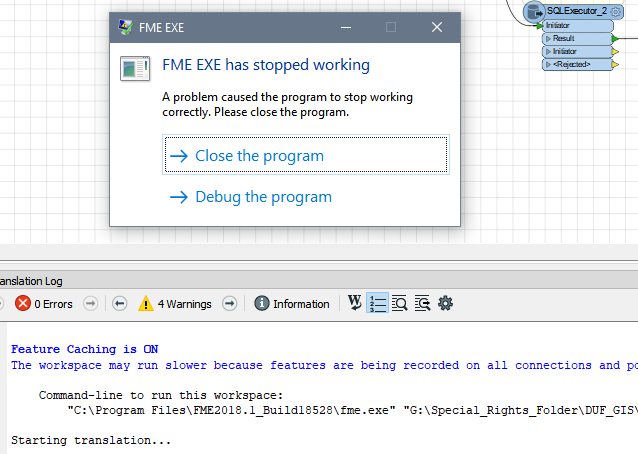
Testing the workspace in FME 2017.1 is fine, but running the workspace in 2018.1 doesn't work - FME EXE stops immediately after starting translation
0684Q00000ArAifQAF.png

Here's the script used by the parameter

from datetime import datetime
return datetime.now().strftime('%Y-%m-%d_%I%M%p')

I have the preferred python interpreter set to Esri ArcGIS Desktop Python (2.7)

I'm very new to python so apologies if i'm missing something obvious. Thanks!



Best answer by carmijo

What happens if you set the Python interpreter (in the Workspace navigator) to the regular Python 2.7 and not the one supplied by ArcGIS?

It looks like it resolved itself. Not sure what happened but it's working after the weekend. Thanks

This post is closed to further activity.
It may be an old question, an answered question, an implemented idea, or a notification-only post.
Please check post dates before relying on any information in a question or answer.
For follow-up or related questions, please post a new question or idea.
If there is a genuine update to be made, please contact us and request that the post is reopened.

2 replies

david_r
Celebrity
  • May 27, 2019

What happens if you set the Python interpreter (in the Workspace navigator) to the regular Python 2.7 and not the one supplied by ArcGIS?


carmijo
Supporter
Forum|alt.badge.img+11
  • Author
  • Supporter
  • Best Answer
  • May 28, 2019

What happens if you set the Python interpreter (in the Workspace navigator) to the regular Python 2.7 and not the one supplied by ArcGIS?

It looks like it resolved itself. Not sure what happened but it's working after the weekend. Thanks

