Question

Mimicking the Calculate Functionality in ArcGIS. Am I doing it right?

  • May 10, 2016
  • 5 replies
  • 30 views

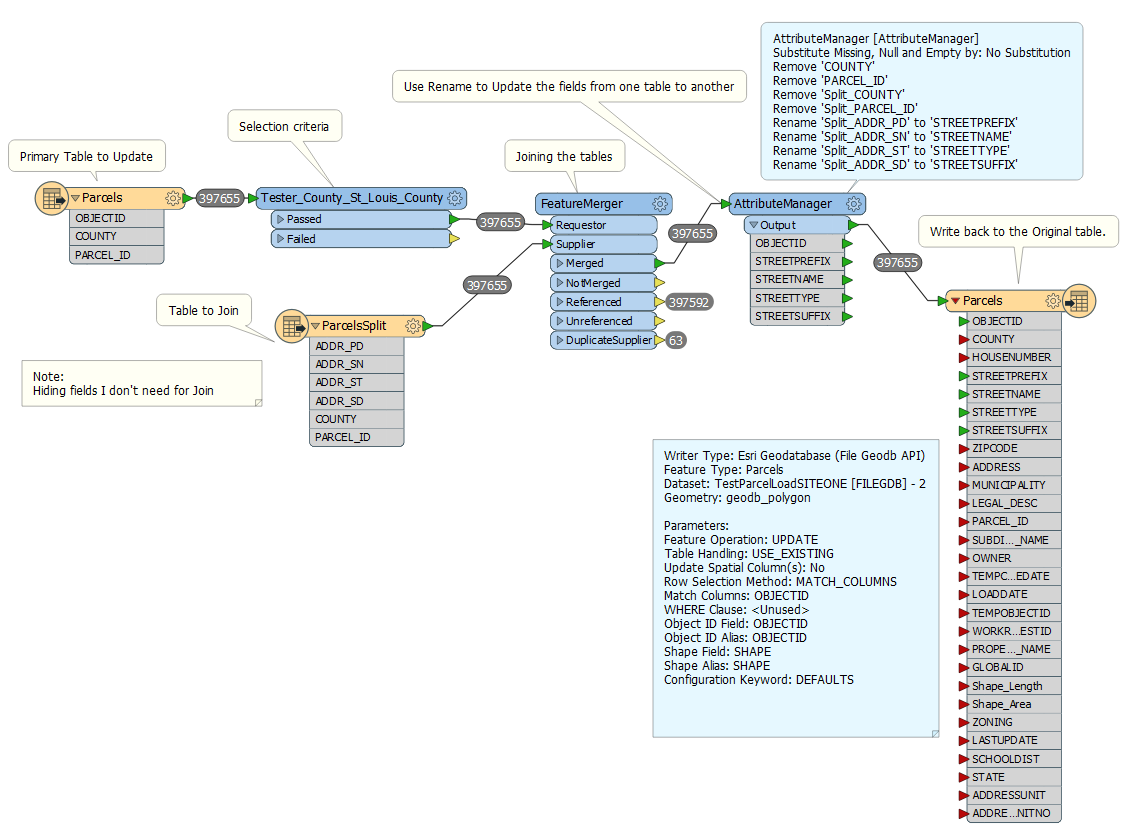
I want to mimic the process of joining another table to a featureclass and calculate an existing field based on the join table for selected records. Since I have several fields I want to update, I thought FME would be a good option.

Does the process below look like the correct approach?

Do indexes in the database help? Or is FME handling this in memory?
This post is closed to further activity.
It may be an old question, an answered question, an implemented idea, or a notification-only post.
Please check post dates before relying on any information in a question or answer.
For follow-up or related questions, please post a new question or idea.
If there is a genuine update to be made, please contact us and request that the post is reopened.

5 replies

jdh
Contributor
Forum|alt.badge.img+40
  • Contributor
  • May 10, 2016

This looks like the right approach for generic data. If however the ParcelsSplit is in a database or tabular format, you might find the Joiner to be more efficient.

Things to consider:


You appear to have some duplicate suppliers (multiple records in ParcelsSplit with the same Parcel_ID). How do you want to handle them?

If you are going with the FeatureMerger, removing rather than hiding fields you don't need is a better approach. Attributes that are not exposed are still propagated on the features and can add significant processing time.


roland.martin
Contributor
Forum|alt.badge.img+11

Further to what @jdh said:

No, this method won't benefit from indices in the database - unless you're using some kind of sub-query on the reader. If you used a Joiner, it might make a difference and could be more efficient.

On your writer, the Features to Write Per Transaction normally defaults to 1000. You can almost certainly increase this value by 10 or 100x, which would likely increase performance.

I suspect removing attributes won't make a lot of difference in this case, but it might be worth exploring.


  • Author
  • May 12, 2016

This looks like the right approach for generic data. If however the ParcelsSplit is in a database or tabular format, you might find the Joiner to be more efficient.

Things to consider:


You appear to have some duplicate suppliers (multiple records in ParcelsSplit with the same Parcel_ID). How do you want to handle them?

If you are going with the FeatureMerger, removing rather than hiding fields you don't need is a better approach. Attributes that are not exposed are still propagated on the features and can add significant processing time.

Just to be clear, when you say removing rather than hiding (like i say in my comment). What I was doing in the reader is unchecking those fields so they aren't read, I assume that is really removing, or is there a different approach for removing fields.

Is the correct technique to rename the fields so they match the target, or is there a more conventional way of assigning one field to another.


  • Author
  • May 12, 2016

Further to what @jdh said:

No, this method won't benefit from indices in the database - unless you're using some kind of sub-query on the reader. If you used a Joiner, it might make a difference and could be more efficient.

On your writer, the Features to Write Per Transaction normally defaults to 1000. You can almost certainly increase this value by 10 or 100x, which would likely increase performance.

I suspect removing attributes won't make a lot of difference in this case, but it might be worth exploring.

Thanks, I will look into the Joiner and play with it. Might be a better technique in general for what I usually need. I see theere are articles comparing them and i will read those.

Also I will test out the write per transaction setting.


jdh
Contributor
Forum|alt.badge.img+40
  • Contributor
  • May 12, 2016

Just to be clear, when you say removing rather than hiding (like i say in my comment). What I was doing in the reader is unchecking those fields so they aren't read, I assume that is really removing, or is there a different approach for removing fields.

Is the correct technique to rename the fields so they match the target, or is there a more conventional way of assigning one field to another.

Unchecking the attributes on the reader hides the attributes so they are not visible on the canvas. The attributes are still being read in and carried through the transformation. If you connect an Inspector, the Table View will not show them but if you look in the Feature Information the attributes are there.