Question

Keep only one attribute (published parameter) renamed in a shape?

  • July 4, 2019
  • 3 replies
  • 26 views

Forum|alt.badge.img

I would like my script to keep only one attribute designated by the user in a shape in which it will be renamed. I created the workspace below.
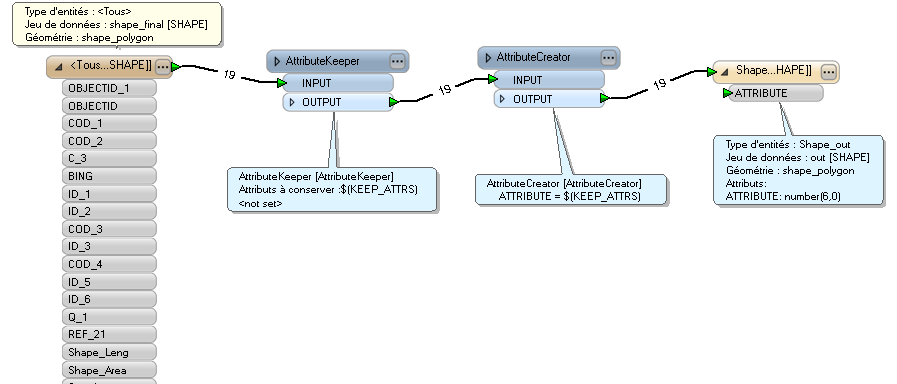


the attribute "ATTRIBUTE" persists in keeping the value 0 while the selected attribute contains 5, 12, 8, 45 ....


Where can my mistake be?


Thank you

This post is closed to further activity.
It may be an old question, an answered question, an implemented idea, or a notification-only post.
Please check post dates before relying on any information in a question or answer.
For follow-up or related questions, please post a new question or idea.
If there is a genuine update to be made, please contact us and request that the post is reopened.

3 replies

jdh
Contributor
Forum|alt.badge.img+40
  • Contributor
  • July 4, 2019

You are setting the new Attribute to the name of the attribute being kept, and since the shapefile writer is expecting a numeric value, it defaults to 0.


You need to either use @Value($(KEEP_ATTRS)) or use an AttributeDereferencer transformer instead.

jdh
Contributor
Forum|alt.badge.img+40
  • Contributor
  • July 4, 2019

You are setting the new Attribute to the name of the attribute being kept, and since the shapefile writer is expecting a numeric value, it defaults to 0.


You need to either use @Value($(KEEP_ATTRS)) or use an AttributeDereferencer transformer instead.

Note that neither will work as expected if you select more than one attribute to keep


alc33
Contributor
Forum|alt.badge.img+13
  • Contributor
  • July 4, 2019

Hi!

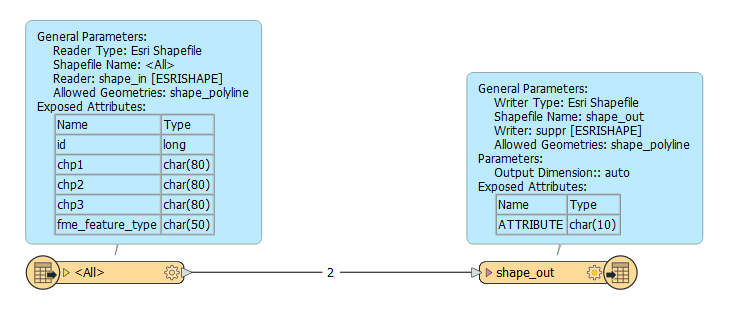
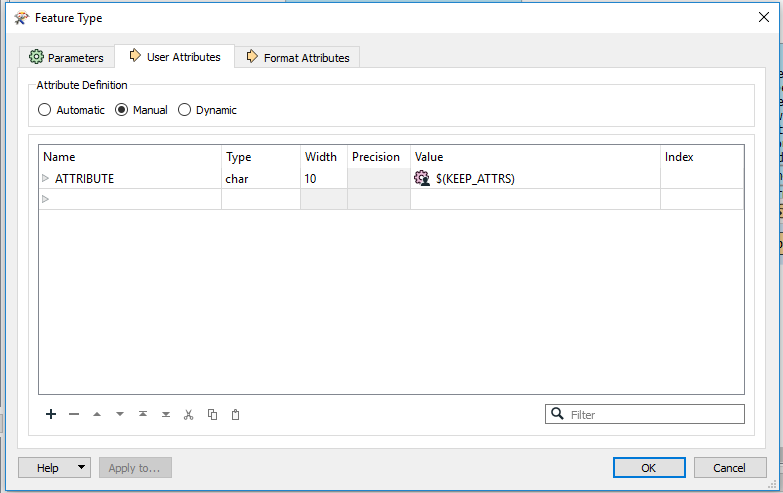
If I well understand your question, you can connect reader to writer directly and create your attribute on "user attributes". Manual mode. You delete the others fields and create a new one called "ATTRIBUTE" with value = $(KEEP_ATTRS)

If you put "5, 12, 8, 45 " on the published parameter, you need to have a type = character.