


Best Answer

HTMLExtractor help appreciated

  • November 2, 2021
  • 3 replies
  • 19 views

bruceharold
Supporter
Forum|alt.badge.img+19

Hi, I'm inefficient with CSS selector statements - having no HTML authoring background. I want the CSV download links at this site and only the csv download links:

https://data.sandiego.gov/datasets/parking-citations/

I can get all 'a' tags and the href references no problem but have to test the result ends with '.csv'. Can anyone give me the right selector syntax for the element I'm after? Thanks all.
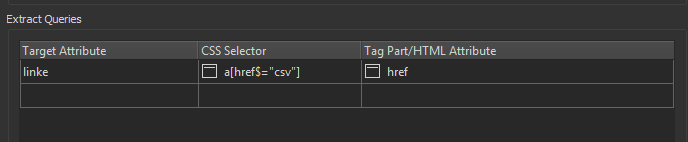

Best answer by ebygomm

Try this setup in the HTML Extractor

image

This post is closed to further activity.
It may be an old question, an answered question, an implemented idea, or a notification-only post.
Please check post dates before relying on any information in a question or answer.
For follow-up or related questions, please post a new question or idea.
If there is a genuine update to be made, please contact us and request that the post is reopened.

3 replies

redgeographics
Celebrity
Forum|alt.badge.img+62

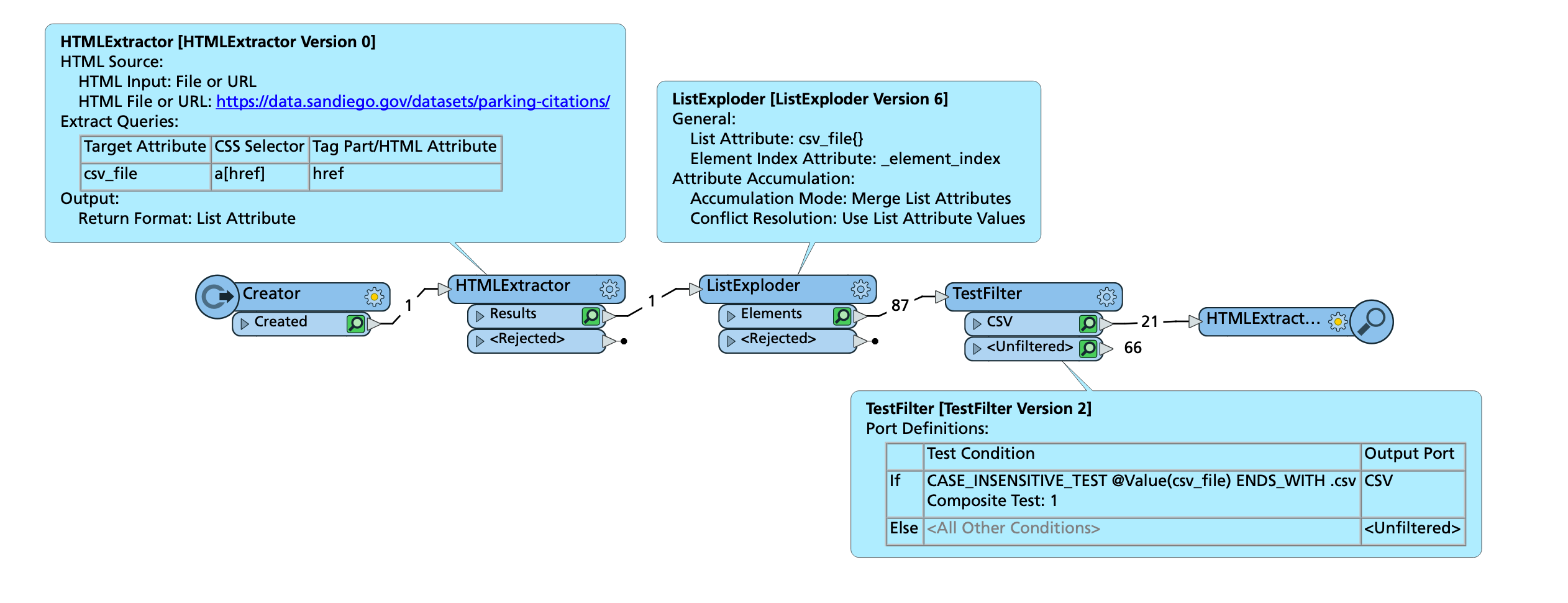
Rather than tinker with CSS selectors I decided to go the easy way:

Extract all links from the entire web page, save it as a list, explode the list and select the ones ending in .csv

Screenshot 2021-11-02 at 15.25.50In addition to that, the filenames are actually predictable, you don't really have to go through the HTMLExtractor at all...



bruceharold
Supporter
Forum|alt.badge.img+19
  • Author
  • Supporter
  • November 2, 2021

Thanks Hans, you'll see in the attached workspace I took a similar approach, but it frustrates me I couldn't quickly figure out CSS selectors.

Ideally HTMLExtractor would be data-aware (Annabelle?) and you could get a picker!


ebygomm
Influencer
Forum|alt.badge.img+46
  • Influencer
  • Best Answer
  • November 2, 2021

Try this setup in the HTML Extractor

image