Question

how to split the readers in seperate workspace connects to the second workspace

  • May 8, 2020
  • 4 replies
  • 12 views

i would like to create the readers in workspace and output of the first workspace as input for the second workspace .


i tried workspace runner but i did not get it to work

and i am not sure where can i find some articles about transponder sender and reciver if that what should i use

Fme 2018


any help plz and thanks


This post is closed to further activity.
It may be an old question, an answered question, an implemented idea, or a notification-only post.
Please check post dates before relying on any information in a question or answer.
For follow-up or related questions, please post a new question or idea.
If there is a genuine update to be made, please contact us and request that the post is reopened.

4 replies

Forum|alt.badge.img+2

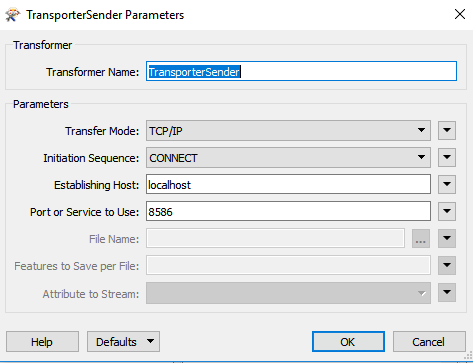
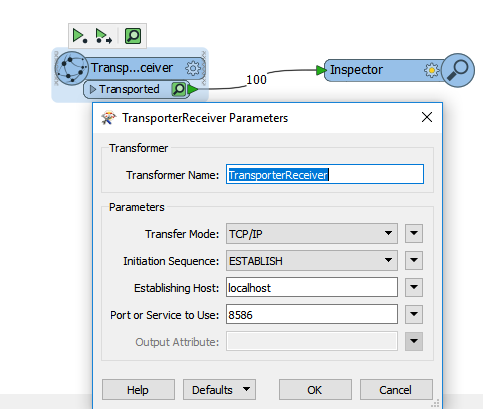
TransporterReceiver with TCPIP and establish will run until the other workbench with TCPIP and connect using the TransporterSender sends the data. The receiving workbench will sit there and run until it finally gets the data from the other workbench.


  • Author
  • May 8, 2020

TransporterReceiver with TCPIP and establish will run until the other workbench with TCPIP and connect using the TransporterSender sends the data. The receiving workbench will sit there and run until it finally gets the data from the other workbench.


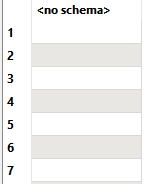
the output at second workspace has no schema

how could i solve that

let me know please also if i want to get temporarily file from first workspace then feed in the second workspace .how could i do that


Forum|alt.badge.img+2


the output at second workspace has no schema

how could i solve that

let me know please also if i want to get temporarily file from first workspace then feed in the second workspace .how could i do that

Oh, sorry! You'll use an AttributeExposer after the TransporterRetriever. Either import the values from excel/csv or type in the ones you need.


  • Author
  • May 11, 2020

Oh, sorry! You'll use an AttributeExposer after the TransporterRetriever. Either import the values from excel/csv or type in the ones you need.

thanks ,it is working