Question

How to have meaningful names when profiling a workspace with dynamically created factories

  • November 30, 2017
  • 3 replies
  • 11 views

Forum|alt.badge.img

Hi,

We are using pyfme.

I'm profiling a workspace using the technique described here: Profiling a workspace.

However, my workspace has a lot of python created factories and my results looks like this:
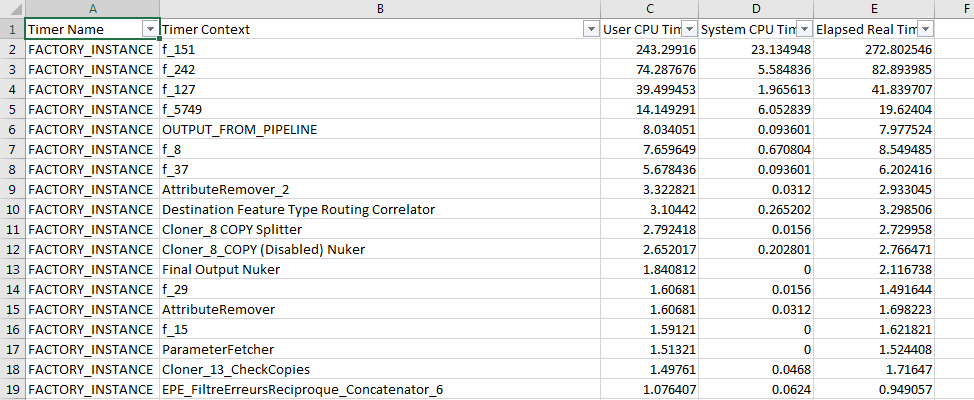
If I take the first one "f_151" there is no trace of that name neither in the log or the fmw file.

My question: Is there any way to create my python factories (FMEFactoryPileline) to have something more talking than "f_151"?

Thanks,

Larry

This post is closed to further activity.
It may be an old question, an answered question, an implemented idea, or a notification-only post.
Please check post dates before relying on any information in a question or answer.
For follow-up or related questions, please post a new question or idea.
If there is a genuine update to be made, please contact us and request that the post is reopened.

3 replies

fmelizard
Safer
Forum|alt.badge.img+21
  • Safer
  • November 30, 2017
Hi @larry,


This is a good question - Are you able to put together a small working example for us? I'm just not entirely sure what you mean by "Dynamically created factories"


Forum|alt.badge.img
  • Author
  • December 1, 2017
Hi @larry,


This is a good question - Are you able to put together a small working example for us? I'm just not entirely sure what you mean by "Dynamically created factories"


Hi @MattAtSafe,


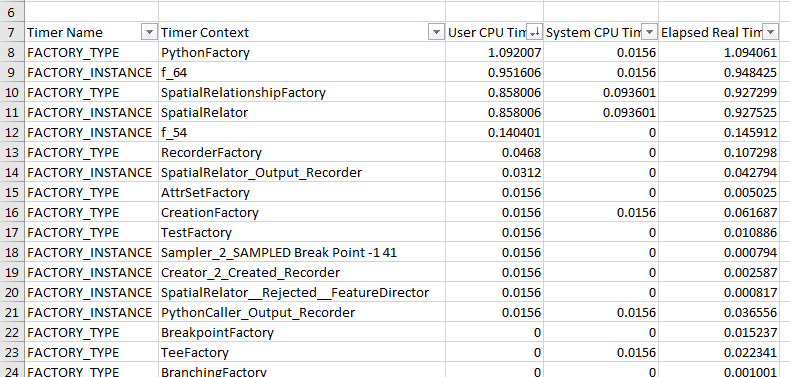
Attached are a workspace and generated CSV file.


I have there two dynamically created python factories named MyFactory and MyFactory2.


But in the profiler output, they are named f_64 and f_54. Is there any way to have a better naming so I can know who's who?


Regards,


Pierre


profile.csv


fmelizard
Safer
Forum|alt.badge.img+21
  • Safer
  • February 22, 2018

Hi @larry,


It looks like there has been improvements on this issue in the latest release of FME 2018.0 (build 18270 and above). Please let me know if this helps for your case.