


Best Answer

How to configure TXT structure

  • October 24, 2019
  • 6 replies
  • 31 views

lazarlubomir
Contributor
Forum|alt.badge.img+10

Hello to all FME fans,

I have met one issue, how to configure transformers/writers for TXT with constant/dynamic content.

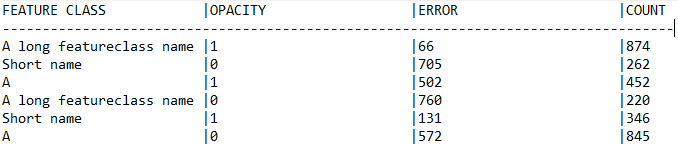
E.g. I just wanna generate TXT report with found errors, like below:

*TOPOLOGY ERRORS

FEATURE CLASS | OPACITY | ERROR | COUNT

--------------------------------------------------------------------------------

Value(FT) | Value(O) | Valu(E) | 10

--------------------------------------------------------------------------------


Please, as You can see, there mix of constant/dynamic (attribute) items.

How can I define to constant items its firm position (column 32) etc.?


Thank You so much!

Lubo
 

Best answer by ebygomm

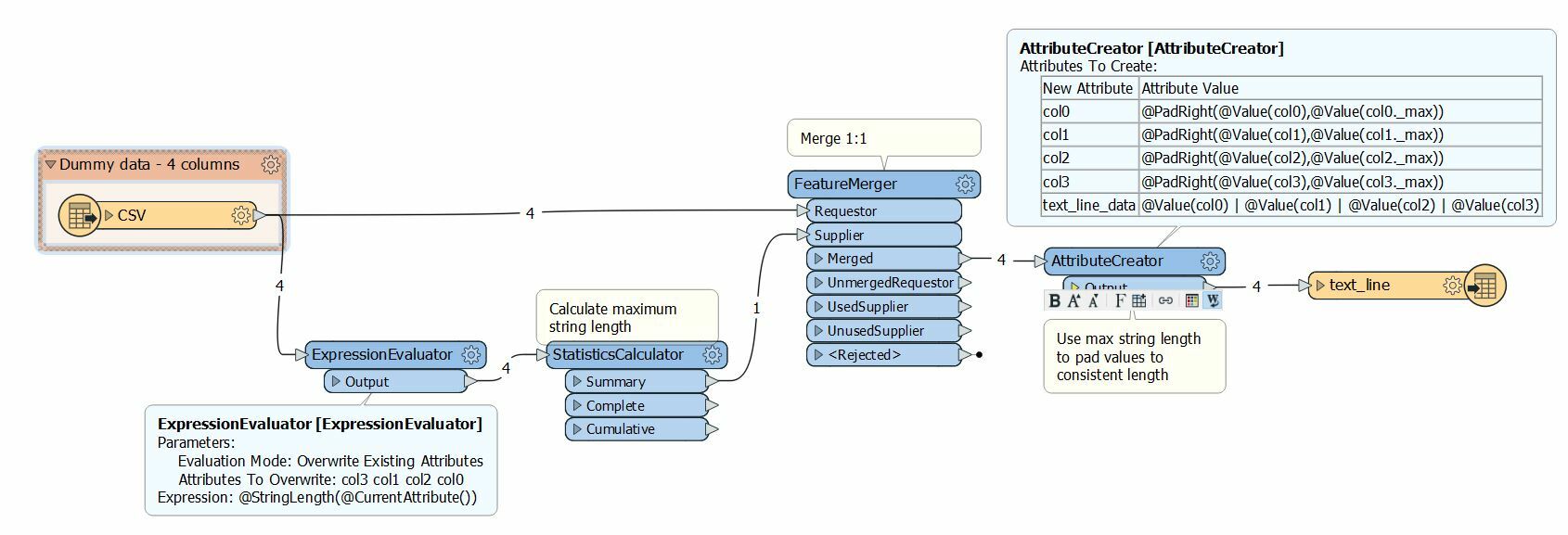
One possible way of calculating the max length a field would be and using that as the value to pad the figures to make them a consistent length

csv22textline.fmwt

This post is closed to further activity.
It may be an old question, an answered question, an implemented idea, or a notification-only post.
Please check post dates before relying on any information in a question or answer.
For follow-up or related questions, please post a new question or idea.
If there is a genuine update to be made, please contact us and request that the post is reopened.

6 replies

sigtill
Supporter
Forum|alt.badge.img+25
  • Supporter
  • October 24, 2019

Hi @lazarlubomir

The CAT (Column aligned writer) might help you. However I find it better to use a regular writer and then "parse" the lines according to the standard myself by creating each line "manually" using an Attributecreator. Especially if the style changes through the file - for instance 4 columns in the start, then a header, then a breakline etc.


ebygomm
Influencer
Forum|alt.badge.img+46
  • Influencer
  • October 24, 2019

I would use a stringpadder to pad whitespace up to a specific length before creating the text_line_data attribute


Might be a bit convoluted if you want to pad different attributes depending on the longest value


lazarlubomir
Contributor
Forum|alt.badge.img+10
  • Author
  • Contributor
  • October 24, 2019

Hi @lazarlubomir

The CAT (Column aligned writer) might help you. However I find it better to use a regular writer and then "parse" the lines according to the standard myself by creating each line "manually" using an Attributecreator. Especially if the style changes through the file - for instance 4 columns in the start, then a header, then a breakline etc.

@sigtill,

unfortunately, CAT writer doesnt exist - only reader is available. As You recommend - Yes, it a way what I was thinking about, but I try to find "easier" way, how to do that.


virtualcitymatt
Celebrity
Forum|alt.badge.img+47

Use an StringConcatenator to create single line/attribute with "Value(FT) | Value(O) | Valu(E) | 10 "


Use an Aggregator to merge the single line - (you can concatonate with a new line Character)

Then use another StringConcatenator to add the static content at the top and bottom of your Aggregated String.


Example attached


none2textline.fmw

ebygomm
Influencer
Forum|alt.badge.img+46
  • Influencer
  • Best Answer
  • October 24, 2019

One possible way of calculating the max length a field would be and using that as the value to pad the figures to make them a consistent length

csv22textline.fmwt


lazarlubomir
Contributor
Forum|alt.badge.img+10
  • Author
  • Contributor
  • October 25, 2019

One possible way of calculating the max length a field would be and using that as the value to pad the figures to make them a consistent length

csv22textline.fmwt

@ebygomm,

this is what I exactly need!

Thank You so much!