Question

FME desktop VDB connection

  • March 17, 2017
  • 10 replies
  • 21 views

Hi,

I'm new on FME and I've to copy data from a VDB to oracle. I'm working with FME 2013 SP4, I think I've to initiate a new reader with the JDBC driver but I don't know how.

Is it possible to have some help/information about that ?

Thanks by advance,

Slop

This post is closed to further activity.
It may be an old question, an answered question, an implemented idea, or a notification-only post.
Please check post dates before relying on any information in a question or answer.
For follow-up or related questions, please post a new question or idea.
If there is a genuine update to be made, please contact us and request that the post is reopened.

10 replies

david_r
Celebrity
  • March 17, 2017

For those of us that don't know, what is a "VDB connection"? I can't find anything by that name in the FME reader/writer gallery.


  • Author
  • March 17, 2017

VDB for virtual database, in my case Teiid. I havn't find anything about that in the gallery.


david_r
Celebrity
  • March 17, 2017

I don't know that format at all, but hopefully section 1.1 Driver Connection on this page can help you with the connection string and java driver class name for the JDBC reader/writer.


  • Author
  • March 17, 2017

Thx for the answer, but the question now is, how to use that on FME ? Wich format can I use on my reader ?


david_r
Celebrity
  • March 17, 2017

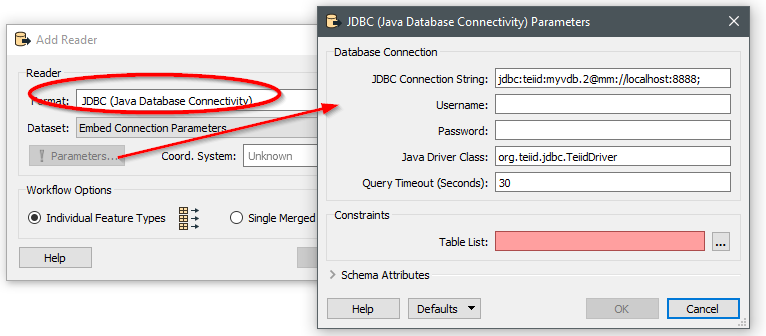
Try the JDBC reader, my guess would be something like this:

Obviously the parameters above are made up, I haven't got an instance of Teiid to test against.


  • Author
  • March 17, 2017

I havn't JDBC format on my gallery :( that's the problem


david_r
Celebrity
  • March 17, 2017

Ah, I didn't notice that you were on FME 2013. You'll have to upgrade as the JDBC support was introduced with FME 2015.0

You can download the latest version of FME here:

http://www.safe.com/support/support-resources/fme-downloads/


Or older versions here:

http://www.safe.com/support/support-resources/fme-downloads/archived/

If you need to preserve your old version you can simply install a newer version of FME in a separate directory, they will coexist nicely.


  • Author
  • March 17, 2017

Humm I'll see if we can upgrade our FME version but I don't think so. I mean we could but we'll have to upgrade our server etc...

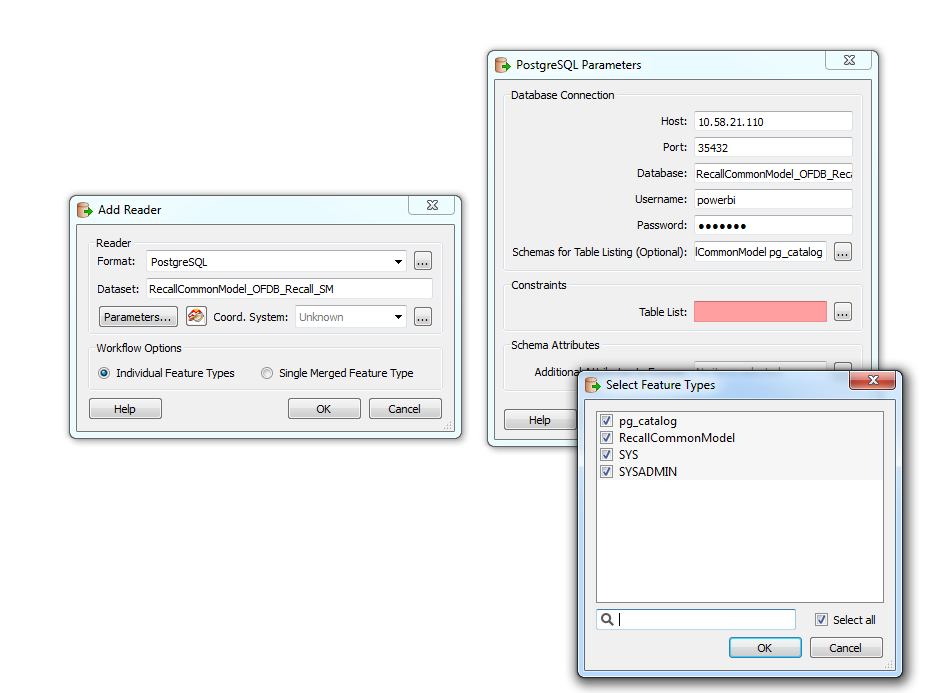
I'm trying to initiate a reader with the Postgre format and it almost worked :

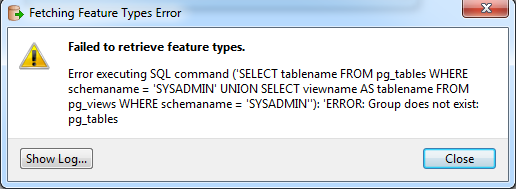
But, I've an error on the "Constraints" section, any information about that ?

Here is the error :


Thanks by advance


david_r
Celebrity
  • March 20, 2017

Make sure that the "powerbi" user has sufficient rights, in particular SELECT rights on the "pg_tables" object.


  • Author
  • March 22, 2017

Hi,

Yes the user has sufficient rights. We'll upgrade our version to 2015.

Thanks for your help :)