
Question

FeatureWriter setting all attributes to CHAR 200

  • June 11, 2020
  • 8 replies
  • 63 views

Hi,

When I first created my workbench, the FeatureWriter seemed to create all my shapefiles properly. Featres were coming from an SDE GeoDB through a FeatureReader, and then after some manipulation, exported though the FeaureWriter with no problems.

Now when I go to take an existing feature that is already in the FeatureReader, and export a different shapefile through the existing FeatureWriter, all of the attributes end up being CHAR 200. I'm not sure why this is happening.

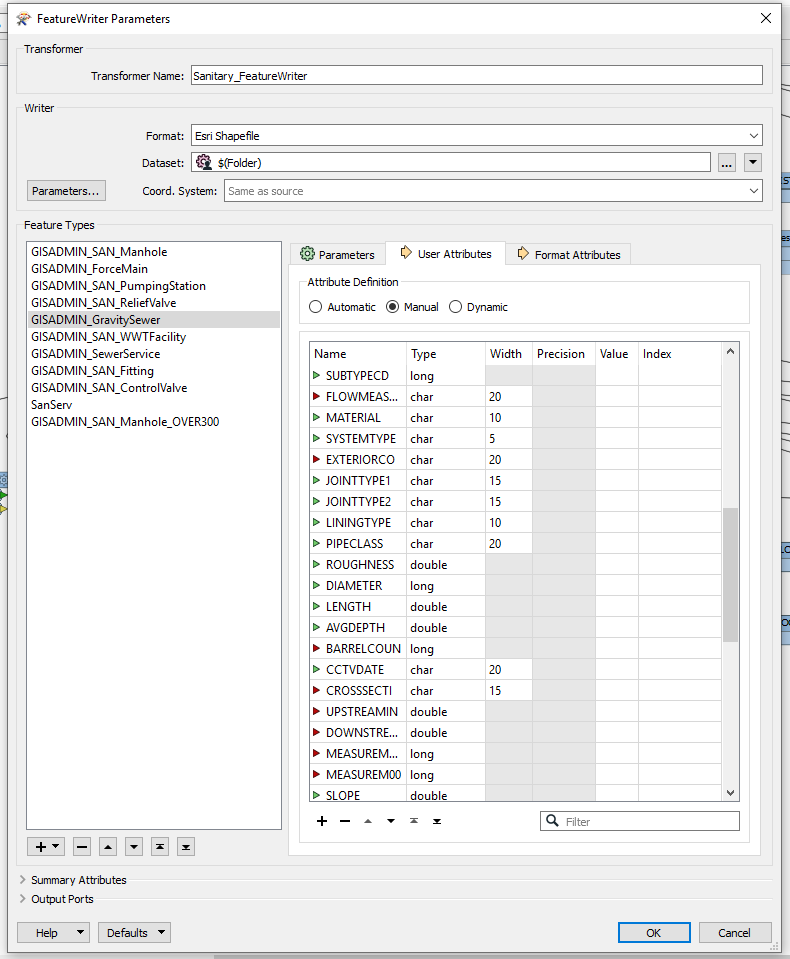
Here is a screen shot of an existing shapefile in the FeatureWriter, where the attributes are correct.
 

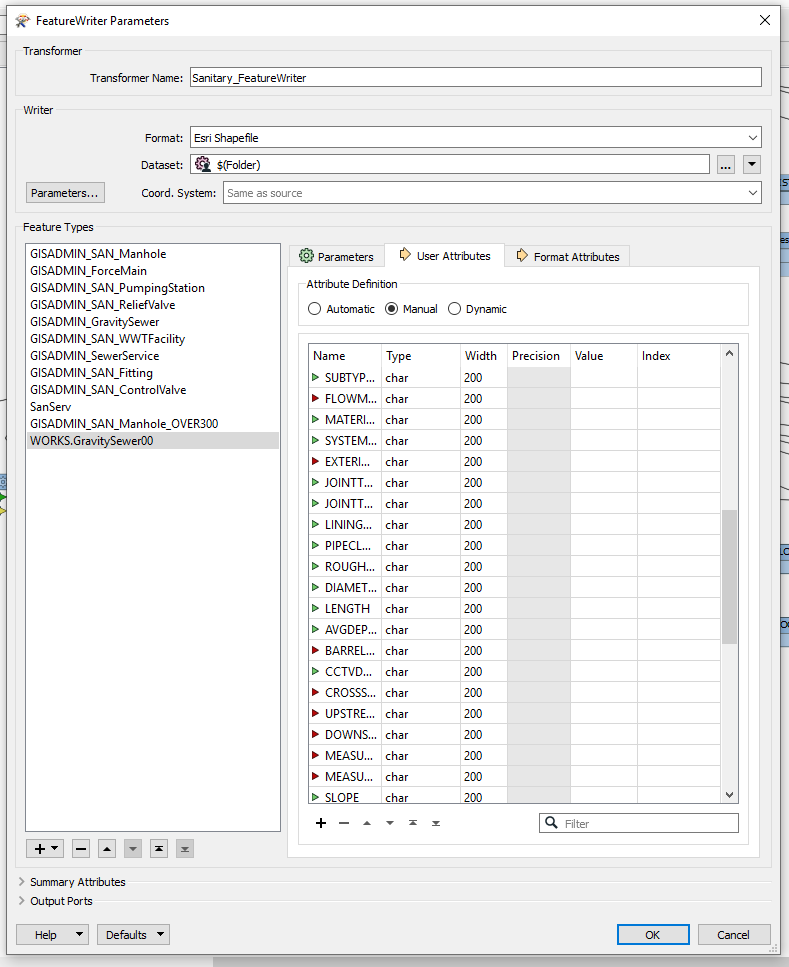
If I take the same source feature, and add it to the FeatureWriter and just give it a new export name, the attributes are all messed up.
 

Any ideas are appreciated.


Thanks

This post is closed to further activity.
It may be an old question, an answered question, an implemented idea, or a notification-only post.
Please check post dates before relying on any information in a question or answer.
For follow-up or related questions, please post a new question or idea.
If there is a genuine update to be made, please contact us and request that the post is reopened.

8 replies

fmelizard
Safer
Forum|alt.badge.img+21
  • Safer
  • June 11, 2020

Hi @bbulla Which build of FME are you using? If it's FME 2020 or higher then please send us details via https://www.safe.com/support/report-a-problem/ Thanks!


  • Author
  • June 12, 2020

Hi @bbulla Which build of FME are you using? If it's FME 2020 or higher then please send us details via https://www.safe.com/support/report-a-problem/ Thanks!

Hi @danatsafe,


I am using FME 2018. Is there anything I can try to get things straightened out?


Thanks,


fmelizard
Safer
Forum|alt.badge.img+21
  • Safer
  • June 12, 2020

Hi @danatsafe,


I am using FME 2018. Is there anything I can try to get things straightened out?


Thanks,


@bbulla I'm not able to reproduce your FeatureWriter problem with FME 2018 or 2020. If possible, try FME 2020 to see if the problem still exits. If you can't do that then please send us a repro package to test here.


  • Author
  • June 12, 2020

@bbulla I'm not able to reproduce your FeatureWriter problem with FME 2018 or 2020. If possible, try FME 2020 to see if the problem still exits. If you can't do that then please send us a repro package to test here.

@danatsafe Not sure if I have 2020 available to me. I'll ask my IT department. If not, can you tell me what a 'repro' package is??


fmelizard
Safer
Forum|alt.badge.img+21
  • Safer
  • June 12, 2020

@danatsafe Not sure if I have 2020 available to me. I'll ask my IT department. If not, can you tell me what a 'repro' package is??

@bbulla Sorry for my unclear terminology - I meant that you should go to https://www.safe.com/support/report-a-problem/ , file a case, and then attach your workspace, log file, sample data, screen shots, movie, etc. so that we at Safe can try to reproduce your problem here.


Forum|alt.badge.img+2

@bbulla There is a slight difference between your workflows. Are you using AttributeManager or BulkAttributeRenamer to set your attributes to uppercase. AttributeManager will reset the attribute types if you are using 'Automatic' for the attribute definition on the shape writer.


  • Author
  • June 15, 2020

Hi @danatsafe,

What I ended up doing was installing 2020 and then totally rebuilding my entire workbench. I first tried copy/paste from my 2018 to 2020, but was getting some weird results, so just started from scratch again, and now all is working. I'm not having any issues with the FeatureWriter in 2020.


@markatsafe, I'm not totally sure what your talking about as I never mentioned I was using anything to set my attributes to uppercase. But I was using the AttributeManager to do some field manipulation in my 2018 workbench that wasn't working properly.


Thanks!


Forum|alt.badge.img+2

Hi @danatsafe,

What I ended up doing was installing 2020 and then totally rebuilding my entire workbench. I first tried copy/paste from my 2018 to 2020, but was getting some weird results, so just started from scratch again, and now all is working. I'm not having any issues with the FeatureWriter in 2020.


@markatsafe, I'm not totally sure what your talking about as I never mentioned I was using anything to set my attributes to uppercase. But I was using the AttributeManager to do some field manipulation in my 2018 workbench that wasn't working properly.


Thanks!

@bbulla One of the improvements in FME 2020 was to track the data types through the workspace. In 2018, using AttributeManager would reset the data types to char(200).



