Question

Dynamic writer put the new attribute as first column

  • August 4, 2017
  • 3 replies
  • 22 views

Hello,

I have a simple dynamic workflow with Shapefile reader and Oracle writer (something like that) where I had a counter to add an ID in a new column "OBJECTID". This works well but my new column is added at the end of the schema. Is there a way to put this as first column?

Thank you!

Maxime

This post is closed to further activity.
It may be an old question, an answered question, an implemented idea, or a notification-only post.
Please check post dates before relying on any information in a question or answer.
For follow-up or related questions, please post a new question or idea.
If there is a genuine update to be made, please contact us and request that the post is reopened.

3 replies

trentatsafe
Safer
Forum|alt.badge.img+6
  • Safer
  • August 4, 2017

Hello @bescu,

I believe there are a few methods in which you could achieve this. To name two possible options:


1) There is a custom transformer on the FME Hub that will reverse the attribute order. ReverseFeaturesOrder.


2) With using a dynamic workflow, it may be best to try modifying the schema using a the SchemaSetter and lists. An example can be found here: https://knowledge.safe.com/articles/43899/dynamic-workflows-advanced-example-modifying-the-s.html


There are many more options that may achieve the result you are expecting, and they can be found throughout the Dynamic tutorials. Here is the link to them.


https://knowledge.safe.com/articles/1050/dynamic-workflow-tutorial-introduction.html


fmelizard
Safer
Forum|alt.badge.img+21
  • Safer
  • August 4, 2017

Hi @bescu, I would recommend checking out the SchemaSetter transformer. Later on, in that tutorial series, there is an example using the transformer to modify the schema .


danilo_fme
Celebrity
Forum|alt.badge.img+52
  • Celebrity
  • August 4, 2017

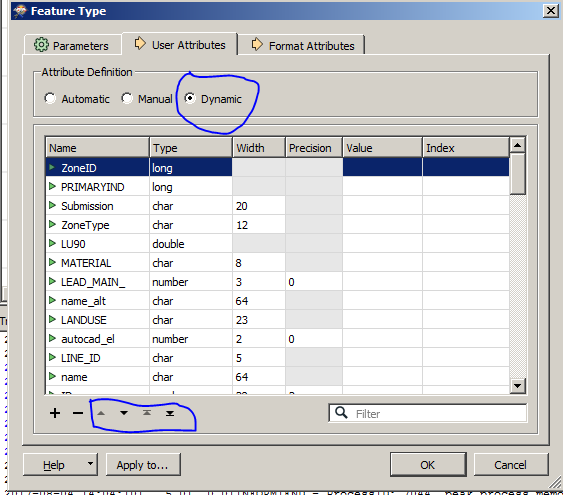
Hi @bescu, did you change the position in Feature Type your Writer :

Thanks,

Danilo