



Hey everyone!
I wanted to share something I’ve been working on for a while.
When I’m debugging our own FME Flow, or one from a supported user, I often need to dig into the log files to track down errors or evidence of what went wrong. This can be really time-consuming: there are many files to open, and some of them are very large. Most of the time I end up just jumping between files and scrolling to the right timestamp, instead of actually focusing on what happened.
To make this easier, I built an FME workspace called FMEFlowLogInvestigator.
This workspace can be published on FME Flow with the Data Streaming Service.
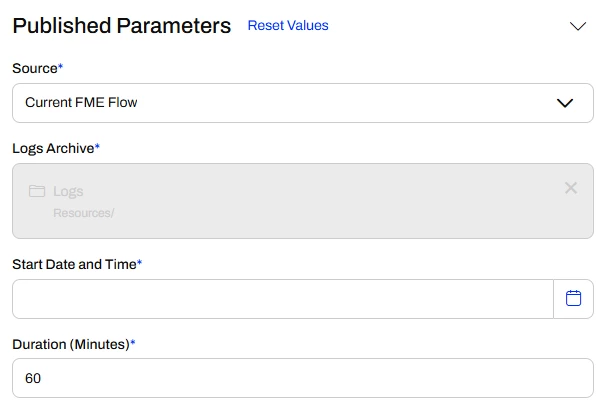
It takes four user parameters:
- Source
Choose between:
- Current FME Flow, analyze the logs of the system the workspace is running on
- Archive, upload a ZIP file containing logs from another FME Flow instance
- Logs Archive
Enabled only when Source = Archive. Allows uploading the ZIP file containing the logs you want to investigate.
- Start Date and Time
A date/time parameter defining the beginning of the time window you want to analyze.
- Duration (minutes)
A numeric value specifying how many minutes of logs to retrieve starting from the chosen date.
The workspace reads all log files (except job logs, since I wanted to focus on Flow services rather than Form/Engine logs), normalizes them, and filters them by timestamp.
The output is an HTML report (built with BRG transformers!) that lists all log files containing entries in the given time window, and displays those logs in a clear format.
It also includes a chart showing log throughput (events per minute), which helps to quickly identify moments of higher activity or error spikes.
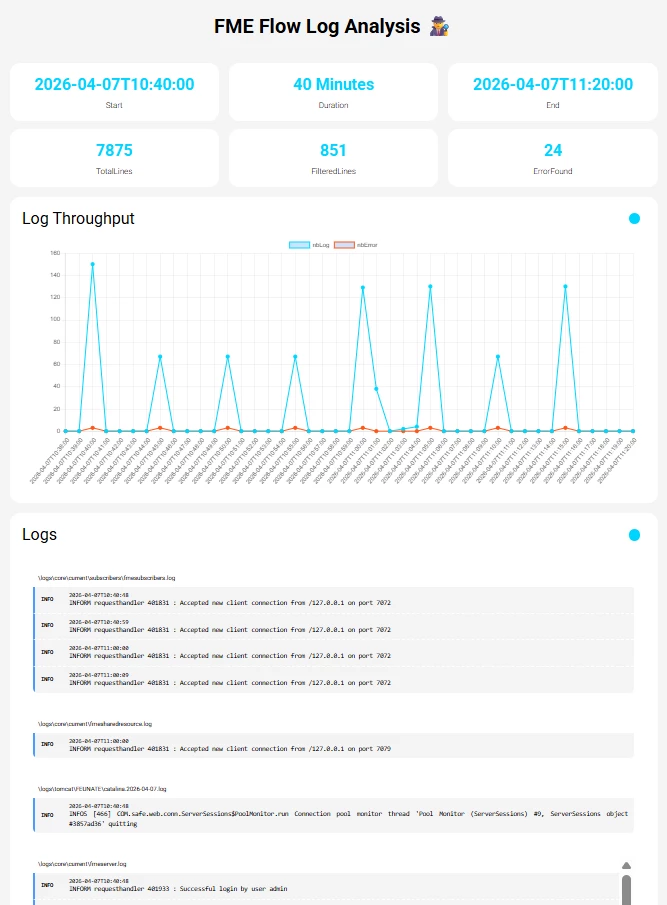
From my testing, it works quite well: it lets me focus only on the relevant files and time window. I also think it could help new FME Flow admins get familiar with the different logs, without having to manually open them all.
That said, keep in mind that the workspace may take some time to run, especially on busy FME Flow instances where there are many log files to read and filter. It is not designed to be run on a regular basis, but rather used occasionally during dedicated log analysis sessions.
I believe this could be useful for many people here, even Safers!
You can find this workspace on the FME Hub, here :
FMEFlowLogInvestigator
To build this, I also created two custom transformers that might be useful on their own in other contexts:
LogNormalizer
Reads and normalizes the timestamp and severity level of an entire log file. Each output feature represents one line of a log file, with the timestamp converted into FME Date/Time format as well as ISO. I tried to make it generic enough so it works on more than just FME Flow logs.
DateTimeFilter
Filters features based on a date attribute. While FME already makes it easy to test for “before/after” conditions, I wanted to capture all features starting from a specific date for a set duration. This transformer supports multiple filter types to handle different use cases.
Both transformers are available on the FME Hub.
I hope these resources are helpful! I’m open to any feedback or suggestions.