


Question

CSV Reader converting data in all CAPS to all lowercase

  • February 12, 2026
  • 2 replies
  • 0 views

kschon109
Contributor
Forum|alt.badge.img+4

I’m working in an FME Form workbench reading in CSV files that reflect database updates and then using them to update a central XLSX file. However, when the CSV reader is pulling in a column with values of either ‘TRUE’ or ‘FALSE’, it is automatically converting them to ‘true’ or ‘false’.

Has anyone ever noticed this with a CSV reader?

Unfortunately the domain I am describing with this data has capitalized values, so reporting the codes as lower case somewhat defeats the purpose. I know the parameter for Case Sensitive Field Names would resolve the issue if i were seeing this in the attribute names but unfortunately i haven’t been able to find a similar parameter for the data itself.

Is this just an inherent setting to the CSV reader format?

2 replies

javierml
Contributor
Forum|alt.badge.img+3
  • Contributor
  • February 13, 2026

Hi ​@kschon109 , 


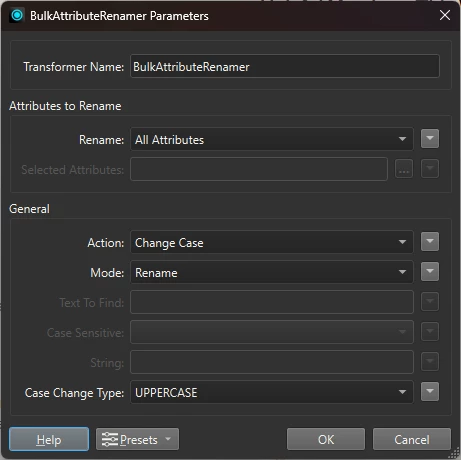
maybe it isn’t the answer you’re looking for because I can’t recall any occasion in which this CSV behaviour has appened to me before. But in case, if that happens you with a reader, you can always try the BulkAttributeRenamer transformer and set it up to “Case = Change Case” and “Case Change Type = UPPERCASE”. 

Unfortunately, this only solves the problem if you use it happens when csv is a reader and you don’t mind adding an extra transformer to your workspace. Does this problem also happen when setting up the .csv as a writer? And does it only happen in FME or have you also seen a similar case with other softwares?


ebygomm
Influencer
Forum|alt.badge.img+46
  • Influencer
  • February 13, 2026

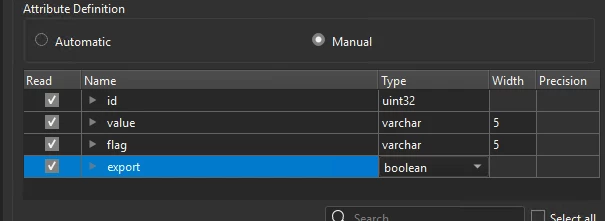
I’ve not seen true/false, I have seen yes/no when the type has been set to Boolean under Attribute Definition

It’s probably worth taking a look at the attribute definition set in the reader to check what is set there