




Question

FME 2025.1 - How to fix a custom loop?

  • February 26, 2026
  • 6 replies
  • 126 views

vincenty
Contributor
Forum|alt.badge.img+5

Hi,

In a workbench, I created a Custom Transformer to loop batch of features.

It is a workaround to prevent machine reboot on large feature datasets processing. At least, writing-along features in the Output to .csv. file help to recover features processed in PythonCaller and it is easier to resume for the remaining features… 

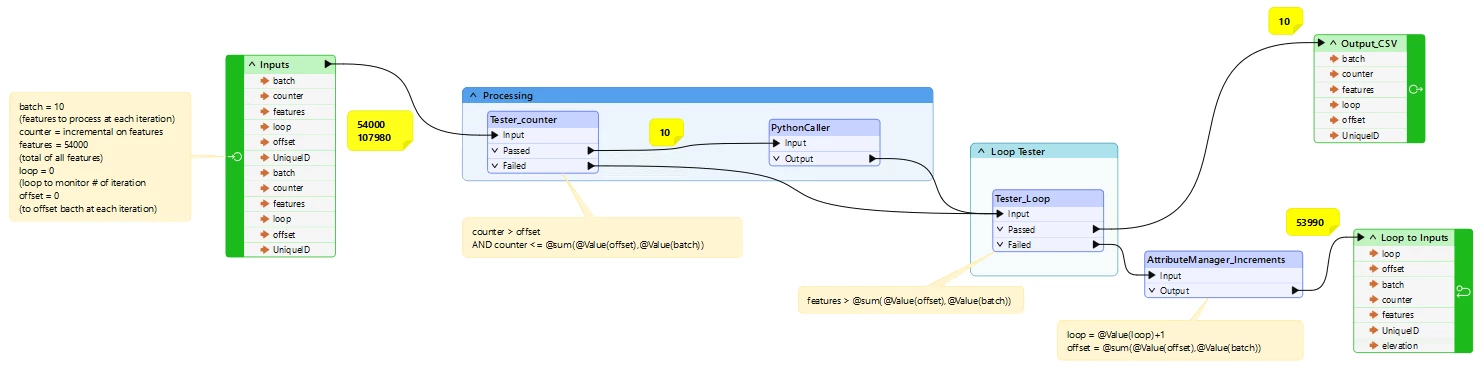
Here is the workbench, with Inputs:

batch = 10

counter = 54000 (total of features)

loop = 0 (to keep track of iteration)

offset = 0

The Tester_counter transformer filter out batches 10 features at each iteration, sent to PythonCaller. At the end of processing the Tester_Loop tests if there is remaining features to process. Anything processed is sent to the Output and written in a .csv Writer transformer in the ‘Main’ workbench, whereas ‘failed’ remaining features from Tester_counter have their attributes incremented for variables loop and offset for the next iteration.

However, when running the workbench, the output .csv file is created but kept empty. Also, each iteration resent features incrementally from the inputs (as shown in yellow). As a result, it does not work!

Is there anything obvious to fix? Or is there anything wrong in the looping logic?

Thanks
 

6 replies

hkingsbury
Celebrity
Forum|alt.badge.img+70
  • Celebrity
  • February 26, 2026

Instead of looping, have you considered group the data into small subsets (either naturally using attribute values, or into groups of X) then either processing using a custom transformer with group by, or using a child workspace and using the workspace runner?


vincenty
Contributor
Forum|alt.badge.img+5
  • Author
  • Contributor
  • February 27, 2026

Thanks, is it the Grouper transformer you mentioned here?

I will investigate and do some testing. For info, before entering the Custom Loop above, I use a Sorter transformer on IDs and a Counter transformer to create the ‘counter’ variable used in the loop in the Tester to send batches of 10 features at each iteration… That’s a sort of ‘data grouping’ but I guess you meant something else here.

As for WorkspaceRunner, I got mixed up with UserParameters not sending correctly between workbenches and I gave up this option, so far.


hkingsbury
Celebrity
Forum|alt.badge.img+70
  • Celebrity
  • March 1, 2026

Its not a transformer - Group By is a functionality where you can group features to only process within a defined group, essentially reducing the processing size

https://docs.safe.com/fme/html/FME-Form-Documentation/FME-Transformers/Group_Based_Transformers.htm


In your approach, you’re duplicating each feature dozens/hundreds/thousands (depending on the size of the dataset) of times. If you think of the last group of ten features, they’re looping through every other iteration of the loop. That data needs to be stored and ‘processed’ somewhere. It’s very likely that overhead is contributing to the issues you’re facing.


With group by, what you’re targeting is to split the incoming stream into smaller subsets of data. this could be:

  • Naturally, by using an attribute that already exists in the data, a type, classification, owner - something that subsets the data
  • Artificially, by using something like the ModuloCounter (split into a defined number of groups) or a GroupCounter (split into groups of a defined size)

Once you have the groups defined, you can pass each group through the logic in the custom transformer (with no looping). With Group By enabled (and defined using the attribute holding your grouping from above) FME will isolate each group and process it by itself.


hkingsbury
Celebrity
Forum|alt.badge.img+70
  • Celebrity
  • March 1, 2026

I've split this into a separate reply so it's not lost in my Group By one.

The more I think about it, the less I'm convinced my original suggestion of Group By is the correct approach

Whilst FME can loop, often its not advisable to do so, and there are other more appropriate FME centric ways to achieve your outcome. What are you trying to do in that PythonCaller? CAn the logic in there be replaced by native FME tools? It's possible that by doing so you won't need to loop/groupby/segment the data and can process it as one


vincenty
Contributor
Forum|alt.badge.img+5
  • Author
  • Contributor
  • March 2, 2026

Thanks again for all the thinking…

I placed the GroupCounter just before the custom transformer to created groups. But it looks like I can only use Group By function in the custom transformer itself. I set the Group By in the PythonCaller using the newly _group attribute. And the custom trasnsformer is no longer a loop. But it still processes features one by one until the FeatureWriter to .csv just outside the custom transformer. It does not look like using any grouping capabilities. 

In addition, I noticed that all features feed into the FeatureWriter to .csv are actually not written. The files is created but if you stop the workbench, the file is empty. And this the goal of my loop/batch processing, writing features along in case of machine reboot/crash…

As for PythonCaller, unfortunately I cannot replace the logic with native FME transformer. It is a complex raster processing not available in FME (neither native in ESRI).


vincenty
Contributor
Forum|alt.badge.img+5
  • Author
  • Contributor
  • March 6, 2026

Hi, to follow-up, I found out how to write-along in the .CSV FeatureWriter with no Custom Transformer loop and not Grouper.

Initially, the ultimate goal of my loop was to write-along processed features in the CSV file in case of machine crash/reboot. I could not set up the logic of the loop correctly because it was duplicating unprocessed features dozens/hundreds/thousands of times… Using the Grouper, features were sent along to CSV FeatureWriter but the file kept empty. Actually, I discovered that after a while, fetaures were written to the CSV file! For exemple, after 150 features, if the process stopped, there was some features in the files. There is a latency between processed featured feed to CSV FeatureWriter and the actual file. 

Now, I simply added a Tester on counter attributes using User Parameter to filter out un-processed features when restarting the workbench. That way, new features are appended to the previous CSV file. The only thing to be careful is if a feature was not entirely written (most of the time), the first newly feature is shifted in the CSV file and need to be manually fixed. It is not ideal and could be improved. But it works!

And I realized Grouper had not impact as features were flowing along. I hoped I could write bacthes 1000 by 1000… 

Attached is a dummy workbench with simple .csv file for loop and group I never manged to fix the logic correctly.



