


Question

Automation HTTP Request not able to access job variables (2)

  • April 17, 2026
  • 1 reply
  • 6 views

laurensdelfland
Contributor
Forum|alt.badge.img+9

It seems the issue described in the related topic, where the job variables show in the result, instead of the values, has never been resolved. Or the issue has returned in version 2025.2.4.

As a workaround I can send an email to a Teams-channel. But I looks a lot better when I send an adaptive card to the channel, using a Workflow in that channel.

But as described in the related topic, when I send a adaptive card with a HTTP Request in an Automation, a job variable like {automation.name} just shows as {automation.name} in the result. Of course I would like it to show the name of the automation.

Is there a way to make this work? Or is this a bug and I just have to wait when it will be fixed?


1 reply

laurensdelfland
Contributor
Forum|alt.badge.img+9

I did find a workaround, but it's not very pretty. 

Here is some extra information:

  1. In Teams I created a Workflow with the template “Send webhook warnings to a channel”. This generates a url.
  2. I added the HTTP Request External Action to the Failed-port of a workspace in an automation and used the webhook URL.
  3. I use this json in the Body of the HTTP Request:
    {
    "$schema": "http://adaptivecards.io/schemas/adaptive-card.json",
    "type": "AdaptiveCard",
    "version": "1.5",
    "body": [
    {
    "type": "TextBlock",
    "text": "⛔ {time}: automation {automation.name} failed",
    "weight": "Bolder",
    "size": "Large",
    "wrap": true
    },
    {
    "type": "TextBlock",
    "text": "Created: {job.timeFinished}",
    "isSubtle": true,
    "spacing": "None",
    "wrap": true
    },
    {
    "type": "Container",
    "spacing": "Medium",
    "items": [
    {
    "type": "FactSet",
    "facts": [
    {
    "title": "Workspace",
    "value": "{job.workspace}"
    },
    {
    "title": "Start",
    "value": "{job.timeStarted}"
    },
    {
    "title": "Finish",
    "value": "{job.timeFinished}"
    },
    {
    "title": "Error type",
    "value": "{error.type}"
    }
    ]
    }
    ]
    },
    {
    "type": "Container",
    "style": "attention",
    "spacing": "Medium",
    "items": [
    {
    "type": "TextBlock",
    "text": "❗ Error Message",
    "weight": "Bolder",
    "wrap": true
    },
    {
    "type": "TextBlock",
    "text": "{error.message}",
    "wrap": true
    }
    ]
    },
    {
    "type": "Container",
    "spacing": "Medium",
    "items": [
    {
    "type": "TextBlock",
    "text": "[Automation](https://fme_url/fmeserver/automations/{automation.id})",
    "wrap": true
    },
    {
    "type": "TextBlock",
    "text": "[Job summary](https://fme_url/fmeserver/job/{job.id}/summary)",
    "wrap": true
    }
    ]
    }
    ],
    "actions": [
    {
    "type": "Action.OpenUrl",
    "title": "Open job summary",
    "url": "https://fme_url/fmeserver/job/{job.id}/summary"
    }
    ]
    }

This creates a good looking message in the Teams channel, but {job.id} stays {job.id} and will not turn into a number.

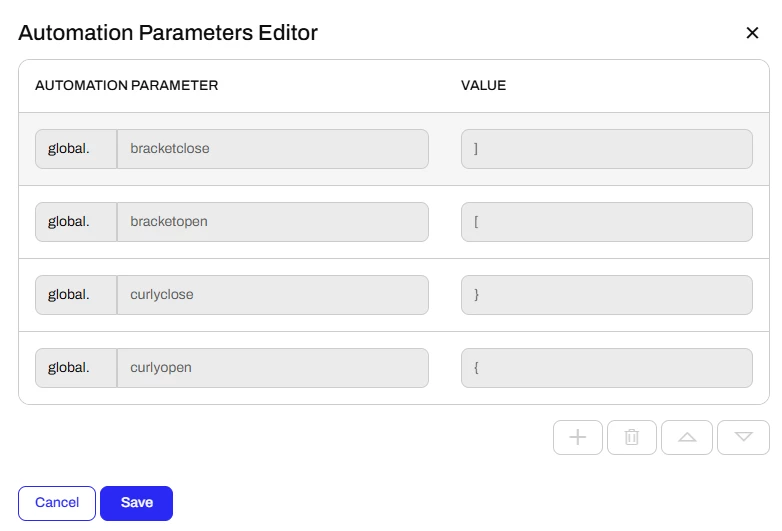
The workaround I used to make this work, is I chopped up the json in 10 pieces. I created 10 Automation-parameters and put every piece in a parameters. In the HTTP Request I stitched all the pieces back together by adding all the parameters: {global.part1}{global.part2}{global.part3} etc.